dus als je hem altijd eerst moet opslaan om hem nadien te kunnen bekijken
downoad dan even dit
http://windowsxp.mvps.org/utils/PPSFix.zip
en run het even , dan zou het wél rechtstreeks moeten gaan vanuit outlook express
---------------------------------------------
voor vista mail is dit moeilijker
opgelet dit is in het register werken (niet voor oningewijden )
minstens eerst een herstelpunt maken !
For .PPS files (Microsoft PowerPoint Slideshow)
* Click Start, type regedit.exe and press ENTER
* Navigate to the following branch:
HKEY_CLASSES_ROOT\PowerPointViewer.SlideShow.11\shell\Show
* Right-click Show and click Rename
* Type the word Open so that Show is replaced by Open command
* If you have PowerPoint Viewer 2007 installed, repeat the above steps in this key, as well:
HKEY_CLASSES_ROOT\PowerPointViewer.SlideShow.12\shell\Show
* After changing Show to Open, close Registry Editor window.
For .PPT files (Microsoft PowerPoint Presentation)
* Click Start, type regedit.exe and press ENTER
* Navigate to the following branch:
HKEY_CLASSES_ROOT\PowerPointViewer.Show.11\shell\Show
* Right-click Show and click Rename
* Type the word Open so that Show is replaced by Open command
* If you have PowerPoint Viewer 2007 installed, repeat the above steps in this key, as well:
HKEY_CLASSES_ROOT\PowerPointViewer.Show.12\shell\Show
* After changing Show to Open, close Registry Editor window.
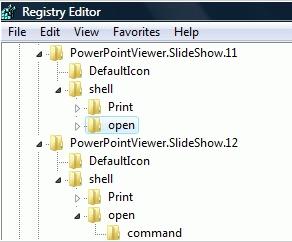
(Fig 1) Show is renamed as Open


