Hallo,
Heb je bewust je systeemherstel uitstaan?
Zorg ook altijd voor een backup.
Lees eerst de handleiding en voer daarna de fix uit
Handleiding Fix
Note: Dit script is speciaal bedoeld voor deze computer, gebruik dit dan ook niet op andere computers met een gelijkaardig probleem.
Klik
Windows knop plus
R tegelijk in.
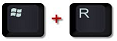
"Uitvoeren" opent vul daar
Notepad in en klik daarna op "OK", Kladblok opent.
Kopieer onderstaande
code en plak dat in "Kladblok"
Code: Selecteer alles
start::
CreateRestorePoint:
CloseProcesses:
(explorer.exe ->) (NortonLifeLock Inc. -> NortonLifeLock Inc.) C:\Users\Public\Downloads\Norton\{NS-22200539-SHPD-FSD5240005}\FSDUI_Custom.exe
HKU\S-1-5-21-570901982-1054645537-1351599378-1000\...\Run: [Norton Download Manager{NS-22200539-SHPD-FSD5240005}] => C:\Users\panter\AppData\Local\Temp\{0F6CB364-02AA-4EFB-9F0D-FA3BEA33B368}\Upgrade.exe [2353000 2022-02-01] (NortonLifeLock Inc. -> NortonLifeLoc
S3 nsvst_NGC; \SystemRoot\System32\drivers\NGCx64\1616010.03A\nsvst.sys [X]
S3 SymEvnt; \??\C:\Program Files\Norton Security\NortonData\22.20.5.39\SymPlatform\SymEvnt.sys [X]
2022-02-28 14:16 - 2021-03-02 23:44 - 000000000 ____D C:\ProgramData\Norton
C:\Program Files\Norton Security
AV: Norton Security (Enabled - Up to date) {AECE2126-F4E7-6909-11F2-1B69D1FBCBD0}
FW: Norton Security (Enabled) {96F5A003-BE88-6851-3AAD-B25C2F288CAB}
ShellIconOverlayIdentifiers: [  OverlayExcluded] -> {4433A54A-1AC8-432F-90FC-85F045CF383C} =>  -> Geen bestand
ShellIconOverlayIdentifiers: [  OverlayPending] -> {F17C0B1E-EF8E-4AD4-8E1B-7D7E8CB23225} =>  -> Geen bestand
ShellIconOverlayIdentifiers: [  OverlayProtected] -> {476D0EA3-80F9-48B5-B70B-05E677C9C148} =>  -> Geen bestand
ShellIconOverlayIdentifiers-x32: [  OverlayExcluded] -> {4433A54A-1AC8-432F-90FC-85F045CF383C} =>  -> Geen bestand
ShellIconOverlayIdentifiers-x32: [  OverlayPending] -> {F17C0B1E-EF8E-4AD4-8E1B-7D7E8CB23225} =>  -> Geen bestand
ShellIconOverlayIdentifiers-x32: [  OverlayProtected] -> {476D0EA3-80F9-48B5-B70B-05E677C9C148} =>  -> Geen bestand
ContextMenuHandlers1: [NortonLifeLock.Norton.Antivirus.IEContextMenu] -> {FAD61B3D-699D-49B2-BE16-7F82CB4C59CA} =>  -> Geen bestand
ContextMenuHandlers2: [NortonLifeLock.Norton.Antivirus.IEContextMenu] -> {FAD61B3D-699D-49B2-BE16-7F82CB4C59CA} =>  -> Geen bestand
ContextMenuHandlers6: [NortonLifeLock.Norton.Antivirus.IEContextMenu] -> {FAD61B3D-699D-49B2-BE16-7F82CB4C59CA} =>  -> Geen bestand
EmptyTemp:
Reboot:
end::
Ga naar
Bestand - Opslaan als.
Kies als locatie
bureaublad.
Bij "Bestandsnaam" zet je:
fixlist.txt.
Bij "Opslaan als type" selecteer je:
Alle bestanden.
Als het goed is staat er nu een text bestand op je bureaublad?
Start de
 Farbar Recovery Scan Tool
.
Als het programma is geopend klik
Yes (Ja) bij de disclaimer. (indien nodig)
Druk op de
Fix knop.
Er zal u een logbestand aangemaakt worden (fixlog.txt) op dezelfde plaats vanwaar de 'tool' is gestart.
Upload fixlog.txt weer, en vertel of je Norton nog ziet.








 Van vitaal belang uiteraard. Hier de link naar het, naar ik hoop, correcte bestand. Ik heb het systeem opnieuw opgestart.



 Als administrator uitvoeren.

