
guy
14 okt 2018, 18:34
Kempen 29 berichten
Dank u, hovel
LAPTOP: Acer Aspire R7, 15,6 inch, Intel Core i7 4500U 1,8 GHz, RAM 8 GB, NVIDIA Geforce GT750M 2 GB, SSD 256 GB, Windows 10 Home, Google Chrome, MS Office 2003
SMARTPHONE: Samsung Galaxy A7

pcekspeer
Startte dit onderwerp 14 okt 2018, 20:09
3530 houthalen limburg 4.214 berichten
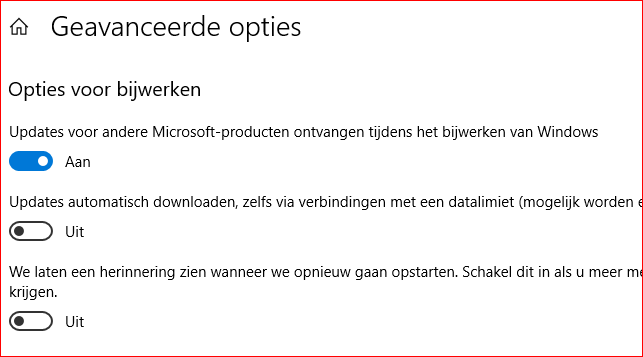
guy schreef:Ik kan de optie "Updates automatisch downloaden .........." niet op "Aan" zetten.
Dan maak je geen gebruik van de mogelijkheid "Data limieten":
https://support.microsoft.com/nl-be/hel ... windows-10
En is uw instelling als volgt:

PC Win7 Prem SP1/64bit/RAM4GB/HD1000GB/IE11//FFox
63.0.3 64bit /Chrome64bit//MSE+Win firewall/WLMail/Gmail/thunderbird/OpenOffice4.1.5/BSA+Micr.SafetyScan+MSRT.-Web Of Trust (WOT)-Spywarebl 5.5--Superantispyw/MBAM/AdwCleaner/JRT/Win10/Ixquick/
guy
14 okt 2018, 20:31
Kempen 29 berichten
Is het beter (veiliger) gebruik te maken van de mogelijkheid "Data limieten"?
Guy
LAPTOP: Acer Aspire R7, 15,6 inch, Intel Core i7 4500U 1,8 GHz, RAM 8 GB, NVIDIA Geforce GT750M 2 GB, SSD 256 GB, Windows 10 Home, Google Chrome, MS Office 2003
SMARTPHONE: Samsung Galaxy A7
pcekspeer
Startte dit onderwerp 15 okt 2018, 01:39
3530 houthalen limburg 4.214 berichten
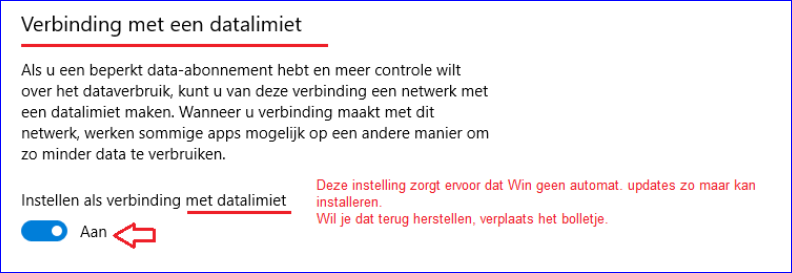
Neen.
Als je dat gebruikt bepaal jij of Win10 updates mag installeren, ze gebeuren dus niet meer automatisch.
PC Win7 Prem SP1/64bit/RAM4GB/HD1000GB/IE11//FFox
63.0.3 64bit /Chrome64bit//MSE+Win firewall/WLMail/Gmail/thunderbird/OpenOffice4.1.5/BSA+Micr.SafetyScan+MSRT.-Web Of Trust (WOT)-Spywarebl 5.5--Superantispyw/MBAM/AdwCleaner/JRT/Win10/Ixquick/
guy
15 okt 2018, 07:59
Kempen 29 berichten
Dank u, pcekspeer
LAPTOP: Acer Aspire R7, 15,6 inch, Intel Core i7 4500U 1,8 GHz, RAM 8 GB, NVIDIA Geforce GT750M 2 GB, SSD 256 GB, Windows 10 Home, Google Chrome, MS Office 2003
SMARTPHONE: Samsung Galaxy A7