Hallo,
Ga naar de map Downloads lopen die en sleep FRST.exe daaruit naar je bureaublad.
Adobe Flash Player 11 ActiveX word niet meer ondersteunt en kan je beter verwijderen:
https://itdaily.be/blog/nieuws/security ... obe-flash/
Lees eerst de handleiding en voer daarna de fix uit
Handleiding Fix
Note: Dit script is speciaal bedoeld voor deze computer, gebruik dit dan ook niet op andere computers met een gelijkaardig probleem.
Klik
Windows knop plus
R tegelijk in.
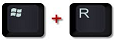
"Uitvoeren" opent vul daar
Notepad in en klik daarna op "OK", Kladblok opent.
Kopieer onderstaande
code en plak dat in "Kladblok"
Code: Selecteer alles
start::
CreateRestorePoint:
CloseProcesses:
Policies: C:\ProgramData\NTUSER.pol: Restrictie <==== AANDACHT
HKLM\SOFTWARE\Policies\Mozilla\Firefox: Restrictie <==== AANDACHT
Task: {321A54A4-9A5F-4B92-911F-B6650C9560C8} - \Microsoft\Windows\UNP\RunCampaignManager -> Geen bestand <==== AANDACHT
Task: {829E3A89-45B7-4E65-A74F-2241F450E67E} - System32\Tasks\PC HelpSoft Driver Updater automatic scan and new device notifications => C:\Program Files (x86)\PC HelpSoft Driver Updater\HDMTray.exe <==== AANDACHT
Task: {E3D4C1DF-9983-44CE-A7D5-25D024A20F19} - \OfficeSoftwareProtectionPlatform\SvcRestartTask -> Geen bestand <==== AANDACHT
Edge Extension: (Geen Naam) -> AutoFormFill_5ED10D46BD7E47DEB1F3685D2C0FCE08 => C:\Windows\SystemApps\Microsoft.MicrosoftEdge_8wekyb3d8bbwe\Assets\HostExtensions\AutoFormFill [niet gevonden]
Edge Extension: (Geen Naam) -> BookReader_B171F20233094AC88D05A8EF7B9763E8 => C:\Windows\SystemApps\Microsoft.MicrosoftEdge_8wekyb3d8bbwe\Assets\BookViewer [niet gevonden]
Edge Extension: (Norton Password Manager) -> EdgeExtension_SymantecCorporation5478111E43ACF_v68kp9n051hdp => C:\Program Files\WindowsApps\SymantecCorporation.5478111E43ACF_6.7.6.0_neutral__v68kp9n051hdp [niet gevonden]
Edge Extension: (Norton Safe Web) -> EdgeExtension_SymantecCorporationNortonSafeWeb_v68kp9n051hdp => C:\Program Files\WindowsApps\SymantecCorporation.NortonSafeWeb_3.11.6.0_neutral__v68kp9n051hdp [niet gevonden]
Edge Extension: (Geen Naam) -> LearningTools_7706F933-971C-41D1-9899-8A026EB5D824 => C:\Windows\SystemApps\Microsoft.MicrosoftEdge_8wekyb3d8bbwe\Assets\HostExtensions\LearningTools [niet gevonden]
Edge Extension: (Geen Naam) -> PinJSAPI_EC01B57063BE468FAB6DB7EBFC3BF368 => C:\Windows\SystemApps\Microsoft.MicrosoftEdge_8wekyb3d8bbwe\Assets\HostExtensions\PinJSAPI [niet gevonden]
FF Plugin-x32: @avg.com/AVG SiteSafety plugin,version=11.0.0.1,application/x-avg-sitesafety-plugin -> C:\Program Files (x86)\Common Files\AVG Secure Search\SiteSafetyInstaller\40.3.1\\npsitesafety.dll [Geen bestand]
FF Plugin-x32: @microsoft.com/OfficeAuthz,version=14.0 -> C:\Program Files (x86)\Microsoft Office\Office14\NPAUTHZ.DLL [Geen bestand]
U1 avgbdisk; geen ImagePath
U3 idsvc; geen ImagePath
2021-09-18 18:21 - 2021-10-07 15:17 - 000002520 _____ C:\WINDOWS\system32\Tasks\PC HelpSoft Driver Updater automatic scan and new device notifications
2021-09-18 18:21 - 2021-09-18 18:22 - 000000000 ____D C:\Users\DGE\AppData\Roaming\PC HelpSoft Driver Updater
2021-09-18 18:20 - 2021-09-18 18:20 - 006065696 _____ (PC HelpSoft ) C:\Users\DGE\Downloads\Driver_Updater.exe
C:\Users\DGE\AppData\Local\{71B06480-C91D-4104-9193-B5BFF47FC3BF}
AV: Norton 360 (Enabled - Up to date) {1122B19A-E671-38EC-8EAC-87048FD4528D}
AV: Norton Security (Enabled - Up to date) {A2708B76-6835-6565-CB96-694212954A75}
FW: Norton Security (Enabled) {9A4B0A53-225A-643D-E0C9-C077EC460D0E}
FW: Norton 360 (Enabled) {291930BF-AC1E-39B4-A5F3-2E31710715F6}
CustomCLSID: HKU\S-1-5-21-2477906437-3195843423-4146880264-1000_Classes\CLSID\{BE5C2E39-090F-46A2-AFAA-47540743B4FE}\InprocServer32 -> C:\Users\DGE\AppData\Local\Google\Update\1.3.36.102\psuser_64.dll => Geen bestand
CustomCLSID: HKU\S-1-5-21-2477906437-3195843423-4146880264-1000_Classes\CLSID\{CA8FA699-91CD-412F-9D13-9B1222F4370E}\InprocServer32 -> C:\Users\DGE\AppData\Local\Google\Update\1.3.36.82\psuser_64.dll => Geen bestand
ContextMenuHandlers1_S-1-5-21-2477906437-3195843423-4146880264-1000: [          kwpsshellext] -> {28A80003-18FD-411D-B0A3-3C81F618E22B} =>  -> Geen bestand
ContextMenuHandlers4_S-1-5-21-2477906437-3195843423-4146880264-1000: [          kwpsshellext] -> {28A80003-18FD-411D-B0A3-3C81F618E22B} =>  -> Geen bestand
ShortcutWithArgument: C:\Users\DGE\AppData\Roaming\Microsoft\Windows\Start Menu\Programs\Chrome-apps\Facebook.lnk -> C:\Program Files (x86)\Google\Chrome\Application\chrome.exe (Google LLC) ->  --profile-directory=Default --app-id=bcgmlnfdinlnhceipoholoejkpbdbohe
Toolbar: HKU\S-1-5-21-2477906437-3195843423-4146880264-1000 -> Geen Naam - {7FEBEFE3-6B19-4349-98D2-FFB09D4B49CA} -  Geen bestand
EmptyTemp:
Reboot:
end::
Ga naar
Bestand - Opslaan als.
Kies als locatie
bureaublad.
Bij "Bestandsnaam" zet je:
fixlist.txt
Bij "Opslaan als type" selecteer je:
Alle bestanden.
Als het goed is staat er nu een text bestand op je bureaublad?
Start de
Farbar Recovery Scan Tool.
Als het programma is geopend klik
Yes (Ja) bij de disclaimer. (indien nodig)
Druk op de
Fix knop.
Er zal u een logbestand aangemaakt worden (fixlog.txt) op dezelfde plaats vanwaar de 'tool' is gestart.
Voeg dit logbestand als
bijlage toe aan het volgende bericht.
Bijlagen plaatsen:
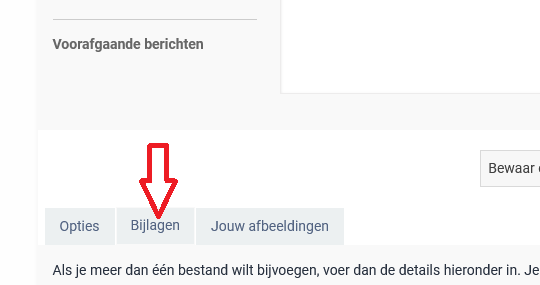
Klik hieronder je bericht op
Bijlagen (zie rode pijl), klik dan "Bestand toevoegen"en ga naar de plaats waar de logjes staan.





 SeniorenNet