Computer - Spyware

systeem fout

Gestart door ghislaine* op 14 jan 2025, 16:24 25 berichten 13.714 keer gelezen Reageer
ghislaine* Startte dit onderwerp 14 jan 2025, 16:24 Menen 278 berichten
Geachte
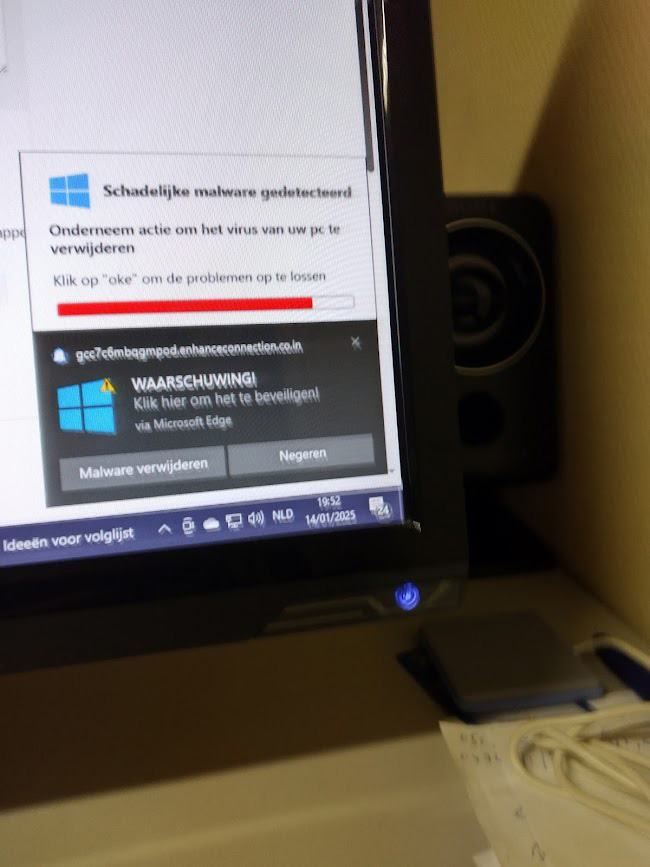
Ik krijg bericht dat er een systeemfout is opgetreden .
En dat ik mijn virus defender moet inschakelen.
Op het bericht staat wel Mac Afee vermeld.

Kan iemand helpen?

ghis
    Citeer
    ghislaine* Startte dit onderwerp 14 jan 2025, 17:51 Menen 278 berichten
    Dit bericht staat niet in een email: het komt links onder op mijn scherm: ik krijg kritische fout, 3 schadelijke virussen gevonden: Met bovenaan Windows beveiliging.
    En als ik via instellingen de beveiliging bekijk zou alles normaal zijn .

    grtjes

    ghis
      Citeer
      sacho 15 jan 2025, 05:45 1.979 berichten
      Vermits het bericht zegt dat er iets zit in de Edge-browser.
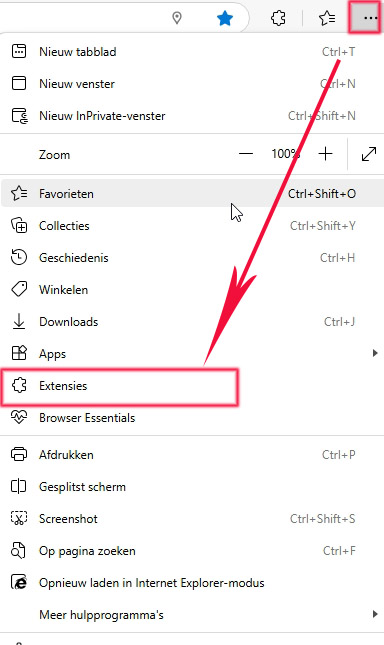
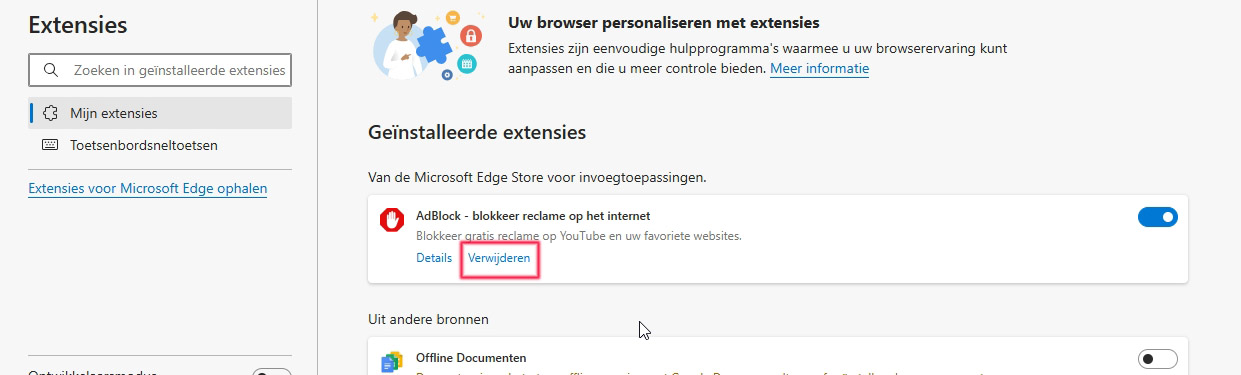
      Start deze en klik bovenaan op die drie puntjes, daar de extensies, klik daarop.
      Zie je daar wat ongewoon?

      Afbeelding

      Je zou het zo kunnen verwijderen uit Edge.


      Afbeelding

      Als daar niks ongewoon is zal je moeten wachten op Abbs, die kan je verder helpen.
      Laat wat weten, dan verwittig ik Abbs zodat die het overneemt.
      Moderator Verhaegen is al maanden niet meer actief op het forum. Waar zit die eigenlijk? wereldreis?
        Citeer
        ghislaine* Startte dit onderwerp 15 jan 2025, 09:31 Menen 278 berichten
        Geachte,

        Ik heb nagezien en niets kunnen uitvoeren.
        Momenteel heb ik die berichten niet.
        Wel krijg ik van facebook tweemaal de vraag of ik met een nieuw apparaat ben ingelogd bij facebook. Ik heb gisteren wel op de site van restaurants hier in de omgeving ingegaan.
        Ik zou graag hebben dat u toch ABBS verwittigt.

        grtjes

        ghis
          Citeer
          sacho 15 jan 2025, 11:50 1.979 berichten
          Ik heb Abbs een bericht verstuurd.
          Nooit op advertenties klikken op facebook, dat zit vol 'rommel'
          zoek beter via Google
            Citeer
            abbs 15 jan 2025, 13:58 Leidschendam 1.589 berichten
            Hallo,

            Om je van deze malware/adware af te helpen voer dan de tool FRST uit.
            Hier de handleiding, ook hoe je de txt bestanden kan plaatsen: viewtopic.php?f=43&t=197564
            Groeten abbs
            Afbeelding
            Member of UNITE (Unified Network of Instructors and Trained Eliminators)
              Citeer
              ghislaine* Startte dit onderwerp 16 jan 2025, 13:17 Menen 278 berichten
              Hello ABBS,
              De link naar we transfer is 065842: die gegevens zijn uitgevoerd als administrator.
              Sorry, maar ik wist niet hoe ik de verkeerde gegevens moest wissen.

              grtjes

              ghis

              Hierbij first en addition:
              Scanresultaten van Farbar Recovery Scan Tool (FRST) (x64) Versie: 14-01-2025
              Gestart door Gebruiker (Beheerder) op DESKTOP-U8ELF9S (MSI MS-7996) (16-01-2025 13:11:07)
              Gestart vanaf C:\Users\Gebruiker\Downloads\FRST64.exe
              Geladen Profielen: Gebruiker
              Platform: Microsoft Windows 10 Home Versie 22H2 19045.5247 (X64) Taal: Nederlands (Nederland)
              Standaardbrowser: Edge
              Boot Modus: Normal

              ==================== Processen (gefilterd) =================

              (Als een item is opgenomen in de fixlist, zal het proces worden gesloten. Het bestand zal niet worden verplaatst.)

              (Adobe Inc. -> Adobe Systems Incorporated) C:\Program Files (x86)\Adobe\Acrobat Reader DC\Reader\AdobeCollabSync.exe <2>
              (C:\Program Files (x86)\Fighters\SPAMfighter\sfagent.exe ->) (SPAMfighter ApS -> SPAMfighter ApS) C:\Program Files (x86)\Fighters\SPAMfighter\x64\LiveKitLoader64.exe
              (C:\Program Files\Malwarebytes\Anti-Malware\MBAMService.exe ->) (Malwarebytes Inc. -> Malwarebytes) C:\Program Files\Malwarebytes\Anti-Malware\Malwarebytes.exe
              (C:\Program Files\WindowsApps\Microsoft.MicrosoftJigsaw_2.7.9181.0_x86__8wekyb3d8bbwe\Jigsaw.exe ->) (Microsoft Corporation -> Microsoft Corporation) C:\Program Files (x86)\Microsoft\EdgeWebView\Application\131.0.2903.146\msedgewebview2.exe <14>
              (explorer.exe ->) (Realtek Semiconductor Corp. -> Realtek Semiconductor) C:\Program Files\Realtek\Audio\HDA\RtkNGUI64.exe
              (Microsoft Corporation -> Microsoft Corporation) C:\Program Files (x86)\Microsoft\Edge\Application\msedge.exe <7>
              (PIRIFORM SOFTWARE LIMITED -> Piriform Software Ltd) C:\Program Files\CCleaner\CCleaner64.exe
              (services.exe ->) (Adobe Inc. -> Adobe Inc.) C:\Program Files (x86)\Common Files\Adobe\ARM\1.0\armsvc.exe
              (services.exe ->) (Apple Computer, Inc.) [Bestand niet getekend] C:\Program Files (x86)\Bonjour\mDNSResponder.exe
              (services.exe ->) (Malwarebytes Inc. -> Malwarebytes) C:\Program Files\Malwarebytes\Anti-Malware\MBAMService.exe
              (services.exe ->) (Microsoft Windows Publisher -> Microsoft Corporation) C:\ProgramData\Microsoft\Windows Defender\Platform\4.18.24090.11-0\MpDefenderCoreService.exe
              (services.exe ->) (Microsoft Windows Publisher -> Microsoft Corporation) C:\ProgramData\Microsoft\Windows Defender\Platform\4.18.24090.11-0\MsMpEng.exe
              (services.exe ->) (Microsoft Windows Publisher -> Microsoft Corporation) C:\ProgramData\Microsoft\Windows Defender\Platform\4.18.24090.11-0\NisSrv.exe
              (services.exe ->) (NVIDIA Corporation -> NVIDIA Corporation) C:\Windows\System32\DriverStore\FileRepository\nv_dispi.inf_amd64_1c83a5d7cffd7bff\Display.NvContainer\NVDisplay.Container.exe <2>
              (services.exe ->) (PIRIFORM SOFTWARE LIMITED -> Piriform Software Ltd) C:\Program Files\CCleaner\CCleanerPerformanceOptimizerService.exe
              (services.exe ->) (SPAMfighter ApS -> SPAMfighter ApS) C:\Program Files (x86)\Fighters\FighterSuiteService.exe
              (services.exe ->) (SPAMfighter ApS -> SPAMfighter ApS) C:\Program Files (x86)\Fighters\SPAMfighter\sfus.exe
              (SPAMfighter ApS -> SPAMfighter ApS) C:\Program Files (x86)\Fighters\SPAMfighter\sfagent.exe
              (SPAMfighter ApS -> SPAMfighter ApS) C:\Program Files (x86)\Fighters\Tray\FightersTray.exe
              (svchost.exe ->) (Adobe Systems Incorporated -> ) C:\Program Files\WindowsApps\ReaderNotificationClient_1.0.4.0_x86__e1rzdqpraam7r\AcrobatNotificationClient.exe
              (svchost.exe ->) (Microsoft Corporation -> ) C:\Program Files\WindowsApps\Microsoft.MicrosoftJigsaw_2.7.9181.0_x86__8wekyb3d8bbwe\Jigsaw.exe
              (svchost.exe ->) (Microsoft Corporation -> Microsoft Corporation) C:\Users\Gebruiker\AppData\Local\Microsoft\OneDrive\24.232.1118.0003\FileCoAuth.exe
              (svchost.exe ->) (Microsoft Windows -> Microsoft Corporation) C:\Windows\ImmersiveControlPanel\SystemSettings.exe
              (svchost.exe ->) (Microsoft Windows -> Microsoft Corporation) C:\Windows\System32\dllhost.exe
              (svchost.exe ->) (Microsoft Windows -> Microsoft Corporation) C:\Windows\System32\MoUsoCoreWorker.exe
              (svchost.exe ->) (Microsoft Windows -> Microsoft Corporation) C:\Windows\System32\smartscreen.exe

              ==================== Register (gefilterd) ===================

              (Als een item is opgenomen in de fixlist, zal het registeritem worden teruggezet naar de standaardwaarden of verwijderd. Het bestand zal niet worden verplaatst.)

              HKLM\...\Run: [RTHDVCPL] => C:\Program Files\Realtek\Audio\HDA\RtkNGUI64.exe [9217024 2017-04-13] (Realtek Semiconductor Corp. -> Realtek Semiconductor)
              HKLM-x32\...\Run: [Acrobat Assistant 8.0] => C:\Program Files (x86)\Adobe\Acrobat 8.0\Acrobat\Acrotray.exe [620152 2006-10-22] (Adobe Systems, Incorporated -> Adobe Systems Inc.)
              HKLM-x32\...\Run: [Adobe_ID0EYTHM] => C:\Program Files (x86)\Common Files\Adobe\Adobe Version Cue CS3\Server\bin\VersionCueCS3Tray.exe [1884160 2007-03-20] (Adobe Systems Incorporated) [Bestand niet getekend]
              HKLM-x32\...\Run: [CommonToolkitTray] => C:\Program Files (x86)\Fighters\Tray\FightersTray.exe [1696400 2019-07-23] (SPAMfighter ApS -> SPAMfighter ApS)
              HKLM-x32\...\Run: [sfagent] => C:\Program Files (x86)\Fighters\SPAMfighter\sfagent.exe [1051232 2021-09-02] (SPAMfighter ApS -> SPAMfighter ApS)
              HKU\S-1-5-21-2676359660-104074025-1020423033-1001\...\Run: [CCleaner Smart Cleaning] => C:\Program Files\CCleaner\CCleaner64.exe [45380000 2024-04-10] (PIRIFORM SOFTWARE LIMITED -> Piriform Software Ltd)
              HKU\S-1-5-21-2676359660-104074025-1020423033-1001\...\Run: [MicrosoftEdgeAutoLaunch_E8980B8735C3CE8D24F16DB99FD3B5FC] => "C:\Program Files (x86)\Microsoft\Edge\Application\msedge.exe" --no-startup-window --win-session-start [3911208 2025-01-09] (Microsoft Corporation -> Microsoft Corporation)
              HKU\S-1-5-21-2676359660-104074025-1020423033-1001\...\Run: [Adobe Reader Synchronizer] => C:\Program Files (x86)\Adobe\Acrobat Reader DC\Reader\AdobeCollabSync.exe [9257880 2024-12-05] (Adobe Inc. -> Adobe Systems Incorporated)
              HKLM\Software\Microsoft\Active Setup\Installed Components: [{8A69D345-D564-463c-AFF1-A69D9E530F96}] -> C:\Program Files (x86)\Google\Chrome\Application\131.0.6778.266\Installer\chrmstp.exe [2025-01-14] (Google LLC -> Google LLC)
              Startup: C:\Users\Gebruiker\AppData\Roaming\Microsoft\Windows\Start Menu\Programs\Startup\EOS Utility.lnk [2017-06-06]
              ShortcutTarget: EOS Utility.lnk -> C:\Program Files (x86)\Canon\EOS Utility\EOS Utility.exe (Geen bestand)
              Startup: C:\Users\Gebruiker\AppData\Roaming\Microsoft\Windows\Start Menu\Programs\Startup\irista Uploader.lnk [2019-01-06]
              ShortcutTarget: irista Uploader.lnk -> C:\Program Files (x86)\Canon\irista Uploader\iristaUploader.exe (Canon Europa N.V. -> )
              Startup: C:\ProgramData\Microsoft\Windows\Start Menu\Programs\Startup\Adobe Acrobat Snelle start.lnk [2017-07-27]
              ShortcutTarget: Adobe Acrobat Snelle start.lnk -> C:\Windows\Installer\{AC76BA86-1040-7D00-7760-000000000003}\_SC_Acrobat.exe () [Bestand niet getekend]
              Startup: C:\ProgramData\Microsoft\Windows\Start Menu\Programs\Startup\Adobe Reader Synchronizer.lnk [2017-07-27]
              ShortcutTarget: Adobe Reader Synchronizer.lnk -> C:\Program Files (x86)\Adobe\Acrobat 8.0\Acrobat\AdobeCollabSync.exe (Adobe Systems, Incorporated -> )

              ==================== Geplande Taken (gefilterd) =================

              (Als een item is opgenomen in de fixlist, wordt het uit het register verwijderd. Het bestand zal niet worden verplaatst tenzij apart vermeld.)

              Task: {22A8BBBC-C53B-4040-BC2A-9328932A4496} - System32\Tasks\Adobe Acrobat Update Task => C:\Program Files (x86)\Common Files\Adobe\ARM\1.0\AdobeARM.exe [1574856 2024-09-25] (Adobe Inc. -> Adobe Inc.)
              Task: {881D98CA-8C2E-4BD6-820C-9E3E9F3E0273} - System32\Tasks\CCleaner Update => C:\Program Files\CCleaner\CCUpdate.exe [714256 2024-04-10] (PIRIFORM SOFTWARE LIMITED -> Piriform Software Ltd)
              Task: {50C960DC-98E6-433F-958A-AF7E08CC524B} - System32\Tasks\CCleanerCrashReporting => C:\Program Files\CCleaner\CCleanerBugReport.exe [5074848 2024-04-10] (PIRIFORM SOFTWARE LIMITED -> Gen Digital Inc. All rights reserved.) -> --product 90 --send dumps|report --path "C:\Program Files\CCleaner\LOG" --programpath "C:\Program Files\CCleaner" --guid "a963527e-89cd-4fab-9bde-c84cd1c0bdd3" --version "6.23.11010" --silent
              Task: {7EF8A4A0-F556-4B4F-A150-8701980CF944} - System32\Tasks\CCleanerSkipUAC - Gebruiker => C:\Program Files\CCleaner\CCleaner.exe [39118752 2024-04-10] (PIRIFORM SOFTWARE LIMITED -> Piriform Software Ltd)
              Task: {71E60082-4D9F-4715-9FE7-A283193C6C9B} - System32\Tasks\GoogleSystem\GoogleUpdater\GoogleUpdaterTaskSystem132.0.6833.6{9DAAF54B-BD18-480D-AE72-08F624A1534E} => C:\Program Files (x86)\Google\GoogleUpdater\132.0.6833.6\updater.exe [5591136 2025-01-07] (Google LLC -> Google LLC)
              Task: {A24CFED5-6245-4D84-88C2-4E7E81629DE7} - System32\Tasks\Microsoft\Windows\Windows Defender\Windows Defender Cache Maintenance => C:\ProgramData\Microsoft\Windows Defender\Platform\4.18.24090.11-0\MpCmdRun.exe [1687360 2024-10-31] (Microsoft Windows Publisher -> Microsoft Corporation)
              Task: {FCEF02C4-FD61-42F8-9443-A40A66D1D6DA} - System32\Tasks\Microsoft\Windows\Windows Defender\Windows Defender Cleanup => C:\ProgramData\Microsoft\Windows Defender\Platform\4.18.24090.11-0\MpCmdRun.exe [1687360 2024-10-31] (Microsoft Windows Publisher -> Microsoft Corporation)
              Task: {0A5C2558-C289-469D-9724-F265DF34D357} - System32\Tasks\Microsoft\Windows\Windows Defender\Windows Defender Scheduled Scan => C:\ProgramData\Microsoft\Windows Defender\Platform\4.18.24090.11-0\MpCmdRun.exe [1687360 2024-10-31] (Microsoft Windows Publisher -> Microsoft Corporation)
              Task: {0C240688-B760-4B90-AD46-7420118AEAF0} - System32\Tasks\Microsoft\Windows\Windows Defender\Windows Defender Verification => C:\ProgramData\Microsoft\Windows Defender\Platform\4.18.24090.11-0\MpCmdRun.exe [1687360 2024-10-31] (Microsoft Windows Publisher -> Microsoft Corporation)
              Task: {706B0FBB-4AF1-4CC9-80DC-EE6FF9EB97DF} - System32\Tasks\Optimize Push Notification Data File-S-1-5-21-2676359660-104074025-1020423033-1001 => {201600D8-6EFF-48CE-B842-E14D37A0682D} C:\WINDOWS\System32\wpninprc.dll [24064 2019-12-07] (Microsoft Windows -> Microsoft Corporation)

              (Als een item is opgenomen in de fixlist, wordt de taak (job) bestand verplaatst. Het bestand dat wordt uitgevoerd door de taak zal niet worden verplaatst.)

              Task: C:\WINDOWS\Tasks\CCleanerCrashReporting.job => C:\Program Files\CCleaner\CCleanerBugReport.exe

              ==================== Internet (gefilterd) ====================

              (Als een item is opgenomen in de fixlist en een registeritem is, wordt het verwijderd of hersteld naar de standaard.)

              Tcpip\Parameters: [DhcpNameServer] 192.168.128.1
              Tcpip\..\Interfaces\{02c0cce3-b6bf-4aee-9b0b-7a1c93359831}: [DhcpNameServer] 192.168.128.1
              Tcpip\..\Interfaces\{02c0cce3-b6bf-4aee-9b0b-7a1c93359831}: [DhcpDomain] home

              Edge:
              =======
              Edge DefaultProfile: Default
              Edge Profile: C:\Users\Gebruiker\AppData\Local\Microsoft\Edge\User Data\Default [2025-01-16]
              Edge Notifications: Default -> hxxps://gcc7c6mbqgmpod.enhanceconnection.co.in; hxxps://int.search.myway.com; hxxps://www.facebook.com; hxxps://www.hln.be; hxxps://www.libelle.nl; hxxps://www.msn.com; hxxps://www.nieuwsblad.be; hxxps://www.test-aankoop.be; hxxps://www.tijd.be
              Edge HomePage: Default -> hxxps://www.google.be/?hl=nl#spf=1
              Edge Extension: (Offline Documenten) - C:\Users\Gebruiker\AppData\Local\Microsoft\Edge\User Data\Default\Extensions\ghbmnnjooekpmoecnnnilnnbdlolhkhi [2024-12-27]
              Edge Extension: (Edge relevant text changes) - C:\Users\Gebruiker\AppData\Local\Microsoft\Edge\User Data\Default\Extensions\jmjflgjpcpepeafmmgdpfkogkghcpiha [2024-01-31]
              Edge Profile: C:\Users\Gebruiker\AppData\Local\Microsoft\Edge\User Data\Profile 1 [2025-01-14]
              Edge StartupUrls: Profile 1 -> "hxxps://account.microsoft.com/?refd=www.bing.com"
              Edge Extension: (Offline Documenten) - C:\Users\Gebruiker\AppData\Local\Microsoft\Edge\User Data\Profile 1\Extensions\ghbmnnjooekpmoecnnnilnnbdlolhkhi [2025-01-05]
              Edge Extension: (Edge relevant text changes) - C:\Users\Gebruiker\AppData\Local\Microsoft\Edge\User Data\Profile 1\Extensions\jmjflgjpcpepeafmmgdpfkogkghcpiha [2024-01-24]
              Edge HKLM-x32\...\Edge\Extension: [ihcjicgdanjaechkgeegckofjjedodee]

              FireFox:
              ========
              FF Plugin: @Microsoft.com/NpCtrl,version=1.0 -> c:\Program Files\Microsoft Silverlight\5.1.50905.0\npctrl.dll [2017-02-10] (Microsoft Corporation -> Microsoft Corporation)
              FF Plugin-x32: @adobe.com/ShockwavePlayer -> C:\Windows\SysWOW64\Adobe\Director\np32dsw_1228198.dll [2017-02-27] (Adobe Systems, Inc.) [Bestand niet getekend]
              FF Plugin-x32: @google.com/npPicasa3,version=3.0.0 -> C:\Program Files (x86)\Google\Picasa3\npPicasa3.dll [2013-04-02] (Google Inc. -> Google, Inc.)
              FF Plugin-x32: @Microsoft.com/NpCtrl,version=1.0 -> c:\Program Files (x86)\Microsoft Silverlight\5.1.50905.0\npctrl.dll [2017-02-10] (Microsoft Corporation -> Microsoft Corporation)
              FF Plugin-x32: @nvidia.com/3DVision -> C:\Program Files (x86)\NVIDIA Corporation\3D Vision\npnv3dv.dll [2017-10-27] (NVIDIA Corporation PE Sign v2016 -> NVIDIA Corporation) [Bestand niet getekend]
              FF Plugin-x32: @nvidia.com/3DVisionStreaming -> C:\Program Files (x86)\NVIDIA Corporation\3D Vision\npnv3dvstreaming.dll [2017-10-27] (NVIDIA Corporation PE Sign v2016 -> NVIDIA Corporation) [Bestand niet getekend]
              FF Plugin-x32: Adobe Reader -> C:\Program Files (x86)\Adobe\Acrobat Reader DC\Reader\AIR\nppdf32.dll [2024-12-05] (Adobe Inc. -> Adobe Systems Inc.)

              Chrome:
              =======
              CHR DefaultProfile: Profile 1
              CHR Profile: C:\Users\Gebruiker\AppData\Local\Google\Chrome\User Data\Guest Profile [2025-01-14]
              CHR Profile: C:\Users\Gebruiker\AppData\Local\Google\Chrome\User Data\Profile 1 [2025-01-14]
              CHR Notifications: Profile 1 -> hxxps://calendar.google.com; hxxps://mail.google.com; hxxps://nl.pinterest.com; hxxps://www.facebook.com; hxxps://www.intelius.com; hxxps://www.pinterest.com
              CHR Extension: (Offline Documenten) - C:\Users\Gebruiker\AppData\Local\Google\Chrome\User Data\Profile 1\Extensions\ghbmnnjooekpmoecnnnilnnbdlolhkhi [2024-12-20]
              CHR Extension: (Avast Online Security & Privacy) - C:\Users\Gebruiker\AppData\Local\Google\Chrome\User Data\Profile 1\Extensions\gomekmidlodglbbmalcneegieacbdmki [2024-07-22]
              CHR Extension: (Malwarebytes Browser Guard) - C:\Users\Gebruiker\AppData\Local\Google\Chrome\User Data\Profile 1\Extensions\ihcjicgdanjaechkgeegckofjjedodee [2024-10-27]
              CHR Extension: (Betalingen via Chrome Web Store) - C:\Users\Gebruiker\AppData\Local\Google\Chrome\User Data\Profile 1\Extensions\nmmhkkegccagdldgiimedpiccmgmieda [2022-10-27]
              CHR Profile: C:\Users\Gebruiker\AppData\Local\Google\Chrome\User Data\System Profile [2025-01-14]
              CHR HKLM-x32\...\Chrome\Extension: [efaidnbmnnnibpcajpcglclefindmkaj]
              CHR HKLM-x32\...\Chrome\Extension: [gomekmidlodglbbmalcneegieacbdmki]
              CHR HKLM-x32\...\Chrome\Extension: [ihcjicgdanjaechkgeegckofjjedodee]

              ==================== Services (gefilterd) ===================

              (Als een item is opgenomen in de fixlist, wordt het uit het register verwijderd. Het bestand zal niet worden verplaatst tenzij apart vermeld.)

              S3 Adobe Version Cue CS3; C:\Program Files (x86)\Common Files\Adobe\Adobe Version Cue CS3\Server\bin\VersionCueCS3.exe [153792 2007-03-20] (Adobe Systems Incorporated -> Adobe Systems Incorporated)
              R2 AdobeARMservice; C:\Program Files (x86)\Common Files\Adobe\ARM\1.0\armsvc.exe [172992 2024-09-25] (Adobe Inc. -> Adobe Inc.)
              R2 Bonjour Service; C:\Program Files (x86)\Bonjour\mDNSResponder.exe [229376 2006-02-28] (Apple Computer, Inc.) [Bestand niet getekend]
              R3 CCleanerPerformanceOptimizerService; C:\Program Files\CCleaner\CCleanerPerformanceOptimizerService.exe [1085856 2024-04-10] (PIRIFORM SOFTWARE LIMITED -> Piriform Software Ltd)
              S3 FLEXnet Licensing Service; C:\Program Files (x86)\Common Files\Macrovision Shared\FLEXnet Publisher\FNPLicensingService.exe [654848 2017-07-27] (Macrovision Europe Ltd.) [Bestand niet getekend]
              R2 MBAMService; C:\Program Files\Malwarebytes\Anti-Malware\MBAMService.exe [9441760 2024-12-18] (Malwarebytes Inc. -> Malwarebytes)
              S3 MBVpnTunnelService; C:\Program Files\Malwarebytes\Anti-Malware\MBVpnTunnelService.exe [2788304 2025-01-11] (Malwarebytes Inc. -> Malwarebytes)
              R2 MDCoreSvc; C:\ProgramData\Microsoft\Windows Defender\Platform\4.18.24090.11-0\MpDefenderCoreService.exe [1447680 2024-10-31] (Microsoft Windows Publisher -> Microsoft Corporation)
              R2 SPAMfighter Update Service; C:\Program Files (x86)\Fighters\SPAMfighter\sfus.exe [218720 2021-09-02] (SPAMfighter ApS -> SPAMfighter ApS)
              R2 Suite Service; C:\Program Files (x86)\Fighters\FighterSuiteService.exe [1284752 2019-07-23] (SPAMfighter ApS -> SPAMfighter ApS)
              R3 WdNisSvc; C:\ProgramData\Microsoft\Windows Defender\Platform\4.18.24090.11-0\NisSrv.exe [3199672 2024-10-31] (Microsoft Windows Publisher -> Microsoft Corporation)
              R2 WinDefend; C:\ProgramData\Microsoft\Windows Defender\Platform\4.18.24090.11-0\MsMpEng.exe [141952 2024-10-31] (Microsoft Windows Publisher -> Microsoft Corporation)
              R2 NVDisplay.ContainerLocalSystem; C:\WINDOWS\System32\DriverStore\FileRepository\nv_dispi.inf_amd64_1c83a5d7cffd7bff\Display.NvContainer\NVDisplay.Container.exe -s NVDisplay.ContainerLocalSystem -f %ProgramData%\NVIDIA\NVDisplay.ContainerLocalSystem.log -l 3 -d C:\WINDOWS\System32\DriverStore\FileRepository\nv_dispi.inf_amd64_1c83a5d7cffd7bff\Display.NvContainer\plugins\LocalSystem -r -p 30000 -cfg NVDisplay.ContainerLocalSystem\LocalSystem

              ===================== Drivers (gefilterd) ===================

              (Als een item is opgenomen in de fixlist, wordt het uit het register verwijderd. Het bestand zal niet worden verplaatst tenzij apart vermeld.)

              S3 BthA2dp; C:\WINDOWS\System32\drivers\BthA2dp.sys [279040 2019-12-07] (Microsoft Corporation) [Bestand niet getekend]
              S3 BthHFEnum; C:\WINDOWS\System32\drivers\bthhfenum.sys [144896 2019-12-07] (Microsoft Corporation) [Bestand niet getekend]
              R2 mbamchameleon; C:\WINDOWS\System32\Drivers\MbamChameleon.sys [232024 2025-01-11] (Microsoft Windows Hardware Compatibility Publisher -> Malwarebytes)
              S0 MbamElam; C:\WINDOWS\System32\DRIVERS\MbamElam.sys [21480 2023-08-17] (Microsoft Windows Early Launch Anti-malware Publisher -> Malwarebytes)
              R3 MBAMSwissArmy; C:\WINDOWS\System32\Drivers\mbamswissarmy.sys [239568 2024-12-06] (Microsoft Windows Hardware Compatibility Publisher -> Malwarebytes)
              R3 MpKslba3be38c; C:\ProgramData\Microsoft\Windows Defender\Definition Updates\{A82FD478-ED9B-4767-AC55-E7EAA6F2E7B0}\MpKslDrv.sys [267552 2025-01-16] (Microsoft Windows -> Microsoft Corporation)
              S0 WdBoot; C:\WINDOWS\System32\drivers\wd\WdBoot.sys [22104 2024-10-31] (Microsoft Windows Early Launch Anti-malware Publisher -> Microsoft Corporation)
              R0 WdFilter; C:\WINDOWS\System32\drivers\wd\WdFilter.sys [606624 2024-10-31] (Microsoft Windows -> Microsoft Corporation)
              R3 WdNisDrv; C:\WINDOWS\System32\drivers\wd\WdNisDrv.sys [105888 2024-10-31] (Microsoft Windows -> Microsoft Corporation)

              ==================== NetSvcs (gefilterd) ===================

              (Als een item is opgenomen in de fixlist, wordt het uit het register verwijderd. Het bestand zal niet worden verplaatst tenzij apart vermeld.)


              ==================== Een maand (aangemaakt) (gefilterd) =========

              (Als een item is opgenomen in de fixlist, wordt de map of het bestand verplaatst.)

              2025-01-16 13:11 - 2025-01-16 13:11 - 000019100 _____ C:\Users\Gebruiker\Downloads\FRST.txt
              2025-01-16 13:08 - 2025-01-16 13:09 - 002403328 _____ (Farbar) C:\Users\Gebruiker\Downloads\FRST64.exe
              2025-01-15 14:22 - 2025-01-15 14:22 - 000000000 ___HD C:\$WinREAgent
              2025-01-14 20:18 - 2025-01-14 20:18 - 000378480 _____ C:\WINDOWS\system32\lc.dat
              2025-01-14 19:57 - 2025-01-14 19:57 - 000896403 _____ C:\Users\Gebruiker\Desktop\foto.htm
              2025-01-10 16:12 - 2025-01-10 16:12 - 000049673 _____ C:\Users\Gebruiker\Downloads\Nieuw_overzicht van je effectenrekening_10_01_2025.pdf
              2024-12-31 08:21 - 2024-12-31 08:21 - 000017746 _____ C:\Users\Gebruiker\Downloads\Rekeninguittreksels_BE30973261393311_2024-12-31_082125.pdf
              2024-12-31 08:19 - 2024-12-31 08:19 - 000011101 _____ C:\Users\Gebruiker\Downloads\Rekeninguittreksels_BE47973499738980_2024-12-31_081921.pdf
              2024-12-31 08:17 - 2024-12-31 08:18 - 000019677 _____ C:\Users\Gebruiker\Downloads\Rekeninguittreksels_BE60979264855370_2024-12-31_081801.pdf
              2024-12-21 09:35 - 2024-12-21 09:35 - 005430632 _____ (Belgian Government) C:\Users\Gebruiker\Downloads\Belgium eID-QuickInstaller 5.1.8.6030 (2).exe

              ==================== Een maand (gewijzigd) ==================

              (Als een item is opgenomen in de fixlist, wordt de map of het bestand verplaatst.)

              2025-01-16 13:11 - 2024-08-11 12:14 - 000000000 ____D C:\FRST
              2025-01-16 13:11 - 2019-12-07 10:14 - 000000000 ____D C:\ProgramData\regid.1991-06.com.microsoft
              2025-01-16 13:07 - 2023-08-17 08:15 - 000000000 ____D C:\Users\Gebruiker\AppData\Local\Malwarebytes
              2025-01-16 12:42 - 2018-10-15 14:52 - 000000000 ____D C:\Program Files\CCleaner
              2025-01-16 12:42 - 2017-04-11 10:20 - 000000000 ___RD C:\Users\Gebruiker\OneDrive
              2025-01-16 09:20 - 2017-06-03 12:01 - 000000000 ____D C:\ProgramData\NVIDIA
              2025-01-16 09:09 - 2020-10-07 13:01 - 000004206 _____ C:\WINDOWS\system32\Tasks\User_Feed_Synchronization-{EADADDFA-64FC-4CF7-9390-1A5ADF1FDDF9}
              2025-01-16 09:09 - 2019-12-07 10:14 - 000000000 ____D C:\WINDOWS\AppReadiness
              2025-01-16 09:07 - 2021-12-19 13:12 - 000000000 ____D C:\WINDOWS\SystemTemp
              2025-01-16 09:07 - 2017-06-07 14:38 - 000000000 ____D C:\Users\Gebruiker\AppData\Roaming\Microsoft\Proof
              2025-01-15 14:25 - 2019-12-07 10:03 - 000000000 ____D C:\WINDOWS\CbsTemp
              2025-01-15 13:16 - 2021-12-11 13:31 - 000003588 _____ C:\WINDOWS\system32\Tasks\OneDrive Reporting Task-S-1-5-21-2676359660-104074025-1020423033-1001
              2025-01-15 13:16 - 2020-10-07 13:01 - 000003386 _____ C:\WINDOWS\system32\Tasks\OneDrive Standalone Update Task-S-1-5-21-2676359660-104074025-1020423033-1001
              2025-01-15 13:16 - 2020-10-07 12:38 - 000002400 _____ C:\Users\Gebruiker\AppData\Roaming\Microsoft\Windows\Start Menu\Programs\OneDrive.lnk
              2025-01-14 22:59 - 2017-04-11 11:11 - 000002328 _____ C:\ProgramData\Microsoft\Windows\Start Menu\Programs\Google Chrome.lnk
              2025-01-14 22:59 - 2017-04-11 11:11 - 000002287 _____ C:\Users\Public\Desktop\Google Chrome.lnk
              2025-01-14 17:47 - 2017-06-07 14:39 - 000000000 ____D C:\Users\Gebruiker\AppData\Roaming\Microsoft\Excel
              2025-01-14 15:51 - 2021-12-09 16:15 - 000000000 ____D C:\Users\Gebruiker\Documents\huishoudrekeningen
              2025-01-14 10:04 - 2019-12-07 10:14 - 000000000 ___HD C:\Program Files\WindowsApps
              2025-01-13 15:00 - 2018-11-08 17:56 - 000000000 ____D C:\Users\Gebruiker\AppData\Local\CrashDumps
              2025-01-12 13:36 - 2017-06-07 14:38 - 000000000 ____D C:\Users\Gebruiker\AppData\Roaming\Microsoft\Word
              2025-01-12 09:07 - 2023-01-17 13:44 - 000002293 _____ C:\Users\Public\Desktop\Microsoft Edge.lnk
              2025-01-12 09:07 - 2020-06-10 10:11 - 000002455 _____ C:\ProgramData\Microsoft\Windows\Start Menu\Programs\Microsoft Edge.lnk
              2025-01-11 12:51 - 2024-12-11 14:13 - 000232024 _____ (Malwarebytes) C:\WINDOWS\system32\Drivers\MbamChameleon.sys
              2025-01-11 10:13 - 2017-04-11 10:19 - 000000000 ____D C:\Users\Gebruiker\AppData\Roaming\Adobe
              2025-01-10 10:29 - 2022-03-11 08:28 - 000000000 ____D C:\Users\Gebruiker\Documents\argenta brieven
              2025-01-01 08:49 - 2021-10-01 17:23 - 000018944 _____ C:\Users\Gebruiker\Documents\Water en electr. opname.xls
              2024-12-25 09:07 - 2018-08-06 19:36 - 000000000 ____D C:\Users\Gebruiker\AppData\Local\D3DSCache
              2024-12-22 08:27 - 2020-10-07 13:01 - 000003730 _____ C:\WINDOWS\system32\Tasks\MicrosoftEdgeUpdateTaskMachineUA
              2024-12-22 08:27 - 2020-10-07 13:01 - 000003606 _____ C:\WINDOWS\system32\Tasks\MicrosoftEdgeUpdateTaskMachineCore
              2024-12-21 09:35 - 2018-05-07 14:08 - 000000000 ____D C:\Program Files (x86)\Belgium Identity Card
              2024-12-20 08:41 - 2024-11-09 08:43 - 000000000 ____D C:\Users\Gebruiker\Documents\sokjes

              ==================== SigCheck ============================

              (Er is geen automatische fix voor bestanden die de verificatie niet doorkomen.)

              ==================== Einde van FRST.txt ========================

              Laatst gewijzigd door ghislaine* op 16 jan 2025, 13:58, 1 keer totaal gewijzigd.

                Citeer
                ghislaine* Startte dit onderwerp 16 jan 2025, 13:21 Menen 278 berichten
                Extra scanresultaten van Farbar Recovery Scan Tool (x64) Versie: 14-01-2025
                Gestart door Gebruiker (16-01-2025 13:12:26)
                Gestart vanaf C:\Users\Gebruiker\Downloads
                Microsoft Windows 10 Home Versie 22H2 19045.5247 (X64) (2020-10-07 12:01:42)
                Boot Modus: Normal
                ==========================================================


                ==================== Accounts: =============================

                (Als een item is opgenomen in de fixlist, zal het worden verwijderd.)

                Administrator (S-1-5-21-2676359660-104074025-1020423033-500 - Administrator - Disabled)
                DefaultAccount (S-1-5-21-2676359660-104074025-1020423033-503 - Limited - Disabled)
                defaultuser0 (S-1-5-21-2676359660-104074025-1020423033-1000 - Limited - Disabled) => C:\Users\defaultuser0
                Gast (S-1-5-21-2676359660-104074025-1020423033-501 - Limited - Disabled)
                Gebruiker (S-1-5-21-2676359660-104074025-1020423033-1001 - Administrator - Enabled) => C:\Users\Gebruiker
                WDAGUtilityAccount (S-1-5-21-2676359660-104074025-1020423033-504 - Limited - Disabled)

                ==================== Security Center ========================

                (Als een item is opgenomen in de fixlist, zal het worden verwijderd.)

                AV: Windows Defender (Enabled - Up to date) {D68DDC3A-831F-4fae-9E44-DA132C1ACF46}
                AS: Windows Defender (Disabled - Up to date) {D68DDC3A-831F-4fae-9E44-DA132C1ACF46}
                AS: Avast Antivirus (Enabled - Up to date) {35C973AA-9ABB-D3CA-B100-B0DC0E5F2402}

                ==================== Geïnstalleerde programma's ======================

                (Alleen de adware-programma's met 'verborgen' vlag kunnen worden toegevoegd aan de fixlist om ze zichtbaar te maken. De adware-programma's moeten handmatig gedeïnstalleerd worden.)

                Adobe Acrobat Reader - Nederlands (HKLM-x32\...\{AC76BA86-7AD7-1043-7B44-AC0F074E4100}) (Version: 24.005.20320 - Adobe Systems Incorporated)
                Adobe AIR (HKLM-x32\...\{25A60C59-0FDC-4D73-81F4-D4A6D4E0CB92}) (Version: 25.0.0.134 - Adobe Systems Incorporated) Hidden
                Adobe AIR (HKLM-x32\...\Adobe AIR) (Version: 25.0.0.134 - Adobe Systems Incorporated)
                Adobe Anchor Service CS3 (HKLM-x32\...\{90176341-0A8B-4CCC-A78D-F862228A6B95}) (Version: 1.0 - Adobe Systems Incorporated) Hidden
                Adobe Asset Services CS3 (HKLM-x32\...\{6FF5DD7A-FE28-4439-B8CF-1E9AF4EA0A61}) (Version: 3 - Adobe Systems Incorporated) Hidden
                Adobe Bridge CS3 (HKLM-x32\...\{9C9824D9-9000-4373-A6A5-D0E5D4831394}) (Version: 2 - Adobe Systems Incorporated) Hidden
                Adobe Bridge Start Meeting (HKLM-x32\...\{08B32819-6EEF-4057-AEDA-5AB681A36A23}) (Version: 1.0 - Adobe Systems Incorporated) Hidden
                Adobe BridgeTalk Plugin CS3 (HKLM-x32\...\{B73CFB12-C814-4638-AFFD-7E3AAFAF0B4E}) (Version: 1.0 - Adobe Systems Incorporated) Hidden
                Adobe Camera Raw 4.0 (HKLM-x32\...\{B3BF6689-A81D-40D8-9A86-4AC4ACD9FC1C}) (Version: 4.0 - Adobe Systems Incorporated) Hidden
                Adobe CMaps (HKLM-x32\...\{A2B242BD-FF8D-4840-9DAA-9170EABEC59C}) (Version: 1.0 - Adobe Systems Incorporated) Hidden
                Adobe Color - Photoshop Specific (HKLM-x32\...\{A2D81E70-2A98-4A08-A628-94388B063C5E}) (Version: 1.0 - Adobe Systems Incorporated) Hidden
                Adobe Color Common Settings (HKLM-x32\...\{DADD7B8A-BCB0-44F5-967A-ECB6B4F2ECD9}) (Version: 1.0 - Adobe Systems Incorporated) Hidden
                Adobe Color EU Recommended Settings (HKLM-x32\...\{73B5D990-04EA-4751-B10F-5534770B91F2}) (Version: 1.0 - Adobe Systems Incorporated) Hidden
                Adobe Color JA Extra Settings (HKLM-x32\...\{DD7DB3C5-6FA3-4FA3-8A71-C2F2940EB029}) (Version: 1.0 - Adobe Systems Incorporated) Hidden
                Adobe Color NA Extra Settings (HKLM-x32\...\{FF29A7E2-FF40-4D07-B7E4-2093DE59E10A}) (Version: 1.0 - Adobe Systems Incorporated) Hidden
                Adobe Creative Suite 3 Design Premium (HKLM-x32\...\{E96CA5F0-9CB2-408D-BF1C-B6441230589D}) (Version: 1.0 - Adobe Systems Incorporated) Hidden
                Adobe Creative Suite 3 Design Premium toevoegen of verwijderen (HKLM-x32\...\Adobe_4f447996d55a2562c006714721fae31) (Version: 1.0 - Adobe Systems Incorporated)
                Adobe Default Language CS3 (HKLM-x32\...\{B9B35331-B7E4-4E5C-BF4C-7BC87856124D}) (Version: 1.0 - Adobe Systems Incorporated) Hidden
                Adobe Device Central CS3 (HKLM-x32\...\{8D2BA474-F406-4710-9AE4-D4F22D21F0DD}) (Version: 1.0 - Adobe Systems Incorporated) Hidden
                Adobe Dreamweaver CS3 (HKLM-x32\...\{DF683F77-6643-4FE1-93FE-AD58FFD2605B}) (Version: 9 - Adobe Systems Incorporated) Hidden
                Adobe ExtendScript Toolkit 2 (HKLM-x32\...\{C2D69781-F392-4118-A5A7-C7E9C38DBFC2}) (Version: 2.0 - Adobe Systems Incorporated) Hidden
                Adobe Extension Manager CS3 (HKLM-x32\...\{BE5F3842-8309-4754-92D5-83E02E6077A3}) (Version: 1.8 - Adobe Systems Incorporated) Hidden
                Adobe Flash CS3 (HKLM-x32\...\{02014354-30AD-4F0D-851B-0223DD915312}) (Version: 9.0 - Adobe Systems Incorporated) Hidden
                Adobe Flash Video Encoder (HKLM-x32\...\{37D0B3E0-A45F-4F7F-B331-4092C46B2EEF}) (Version: 2.0 - Adobe Systems Incorporated) Hidden
                Adobe Fonts All (HKLM-x32\...\{6ABE0BEE-D572-4FE8-B434-9E72A289431B}) (Version: 1.0 - Adobe Systems Incorporated) Hidden
                Adobe Help Viewer CS3 (HKLM-x32\...\{04AF207D-9A77-465A-8B76-991F6AB66245}) (Version: 1 - Adobe Systems Incorporated) Hidden
                Adobe Illustrator CS3 (HKLM-x32\...\{5EB0644E-ED32-400F-A678-F69068069995}) (Version: 13.0.1 - Adobe Systems Incorporated) Hidden
                Adobe InDesign CS3 (HKLM-x32\...\{9C3DEA6C-A9EB-4FA3-886F-16D277C6235B}) (Version: 5.0 - Adobe Systems Incorporated) Hidden
                Adobe InDesign CS3 Icon Handler (HKLM-x32\...\{EA7B3CC4-366D-4CF6-8350-FD7A7034116E}) (Version: 5.0 - Adobe Systems Incorporated) Hidden
                Adobe Linguistics CS3 (HKLM-x32\...\{54793AA1-5001-42F4-ABB6-C364617C6078}) (Version: 3.0.0 - Adobe Systems Incorporated) Hidden
                Adobe MotionPicture Color Files (HKLM-x32\...\{6B708481-748A-4EB4-97C1-CD386244FF77}) (Version: 1.0 - Adobe Systems Incorporated) Hidden
                Adobe PDF Library Files (HKLM-x32\...\{D2559B88-CC9D-4B48-81BB-F492BAA9C48C}) (Version: 8.0 - Adobe Systems Incorporated) Hidden
                Adobe Photoshop CS3 (HKLM-x32\...\{0FFC2836-9B3F-47D6-8B02-333B4E8A2B3D}) (Version: 10 - Adobe Systems Incorporated) Hidden
                Adobe Refresh Manager (HKLM-x32\...\{AC76BA86-0804-1033-1959-018244601102}) (Version: 1.8.0 - Adobe Systems Incorporated) Hidden
                Adobe Setup (HKLM-x32\...\{9395FBA0-534F-45BD-81B6-D8294F49E8ED}) (Version: 1.0 - Adobe Systems Incorporated) Hidden
                Adobe Shockwave Player 12.2 (HKLM-x32\...\Adobe Shockwave Player) (Version: 12.2.8.198 - Adobe Systems, Inc.)
                Adobe SING CS3 (HKLM-x32\...\{B671CBFD-4109-4D35-9252-3062D3CCB7B2}) (Version: 0.1 - Adobe Systems Incorporated) Hidden
                Adobe Stock Photos CS3 (HKLM-x32\...\{29E5EA97-5F74-4A57-B8B2-D4F169117183}) (Version: 1.5 - Adobe Systems Incorporated) Hidden
                Adobe Type Support (HKLM-x32\...\{8E6808E2-613D-4FCD-81A2-6C8FA8E03312}) (Version: 1.0 - Adobe Systems Incorporated) Hidden
                Adobe Update Manager CS3 (HKLM-x32\...\{E69AE897-9E0B-485C-8552-7841F48D42D8}) (Version: 5.1.0 - Adobe Systems Incorporated) Hidden
                Adobe Version Cue CS3 Client (HKLM-x32\...\{D0DFF92A-492E-4C40-B862-A74A173C25C5}) (Version: 3 - Adobe Systems Incorporated) Hidden
                Adobe Version Cue CS3 Server (HKLM-x32\...\{1D58229F-C505-45CA-8223-F35F3A34B963}) (Version: 3.0 - Adobe Systems Incorporated) Hidden
                Adobe WAS CS3 (HKLM-x32\...\{C5BD220A-EFE8-48A5-B70E-9503D535FACE}) (Version: 1.0 - Adobe Systems Incorporated) Hidden
                Adobe WinSoft Linguistics Plugin (HKLM-x32\...\{184CE391-7E0E-4C63-9935-D7A10EDFD3C6}) (Version: 1.0 - Adobe Systems Incorporated) Hidden
                Adobe XMP Panels CS3 (HKLM-x32\...\{802771A9-A856-4A41-ACF7-1450E523C923}) (Version: 1.0 - Adobe Systems Incorporated) Hidden
                AHV content for Acrobat and Flash (HKLM-x32\...\{6BBAA81D-6A7E-43AD-8889-2F002DCAAFDD}) (Version: 1 - Adobe Systems Incorporated) Hidden
                Belgium e-ID middleware 5.1.8 (build 6030) (HKLM\...\{DB942AEA-93D6-4FE4-8862-180D35A76030}) (Version: 5.1.6030 - Belgian Government)
                Belgium e-ID viewer (x86) 5.1.12 (build 6095) (HKLM-x32\...\{F3DC7F06-92FF-4C98-87F5-72C0B7866095}) (Version: 5.1.6095 - Belgian Government)
                CCleaner (HKLM\...\CCleaner) (Version: 6.23 - Piriform)
                CCleaner Update Helper (HKLM-x32\...\{E4EAC0E2-A80B-479F-BA45-DCDA595C9A93}) (Version: 1.8.1651.5 - Piriform Software) Hidden
                Compatibility Pack for the 2007 Office system (HKLM-x32\...\{90120000-0020-0409-0000-0000000FF1CE}) (Version: 12.0.6514.5001 - Microsoft Corporation)
                Connective Signing Plugins (HKLM-x32\...\{4E3E9C50-EC82-44A8-A830-18D6916CB81B}) (Version: 2.0.8 - Connective)
                DriverDoc (HKLM-x32\...\{650580EA-978C-4C04-81B9-BA53BB34BCBE}) (Version: 1.8.0 - Solvusoft Corporation) Hidden
                eID Internet Explorer plugin 1.0.5 (HKLM-x32\...\eid-ie) (Version: 1.0.5 - e-Contract.be BVBA)
                eID Web Browser Middleware (HKLM-x32\...\eID Web Browser Middleware) (Version: 1.2.1 - e-Contract.be BVBA)
                EPSON Scan (HKLM-x32\...\EPSON Scanner) (Version: - )
                FastStone Image Viewer 6.2 (HKLM-x32\...\FastStone Image Viewer) (Version: 6.2 - FastStone Soft)
                Google Chrome (HKLM\...\{8AC8E2E9-87E7-30CA-8308-E737B3911CE5}) (Version: 131.0.6778.266 - Google, Inc.)
                Intel(R) Processor Graphics (HKLM-x32\...\{F0E3AD40-2BBD-4360-9C76-B9AC9A5886EA}) (Version: 21.20.16.4534 - Intel Corporation)
                irista Uploader (HKLM-x32\...\{09474548-FB8E-49D1-849C-1176941FE82B}) (Version: 1.9.3.9056 - Canon) Hidden
                Malwarebytes version 5.2.4.157 (HKLM\...\{35065F43-4BB2-439A-BFF7-0F1014F2E0CD}_is1) (Version: 5.2.4.157 - Malwarebytes)
                Microsoft Edge (HKLM-x32\...\Microsoft Edge) (Version: 131.0.2903.146 - Microsoft Corporation)
                Microsoft Edge WebView2 Runtime (HKLM-x32\...\Microsoft EdgeWebView) (Version: 131.0.2903.146 - Microsoft Corporation) Hidden
                Microsoft HEVC Media Extension Installation for Microsoft.HEVCVideoExtension_1.0.2512.0_x64__8wekyb3d8bbwe (x64) (HKLM\...\{B0169E83-757B-EF66-E2F0-391944D785BC}) (Version: 1.0.0.0 - Microsoft Corporation) Hidden
                Microsoft Office Standard Editie 2003 (HKLM-x32\...\{91120413-6000-11D3-8CFE-0150048383C9}) (Version: 11.0.5614.0 - Microsoft Corporation)
                Microsoft OneDrive (HKU\S-1-5-21-2676359660-104074025-1020423033-1001\...\OneDriveSetup.exe) (Version: 24.232.1118.0003 - Microsoft Corporation)
                Microsoft Silverlight (HKLM\...\{89F4137D-6C26-4A84-BDB8-2E5A4BB71E00}) (Version: 5.1.50905.0 - Microsoft Corporation)
                Microsoft Update Health Tools (HKLM\...\{1FC1A6C2-576E-489A-9B4A-92D21F542136}) (Version: 3.74.0.0 - Microsoft Corporation)
                Microsoft Visual C++ 2008 Redistributable - x86 9.0.30729.17 (HKLM-x32\...\{9A25302D-30C0-39D9-BD6F-21E6EC160475}) (Version: 9.0.30729 - Microsoft Corporation)
                Microsoft Visual C++ 2010 x86 Redistributable - 10.0.40219 (HKLM-x32\...\{F0C3E5D1-1ADE-321E-8167-68EF0DE699A5}) (Version: 10.0.40219 - Microsoft Corporation)
                NVIDIA 3D Vision stuurprogramma 388.13 (HKLM\...\{B2FE1952-0186-46C3-BAEC-A80AA35AC5B8}_Display.3DVision) (Version: 388.13 - NVIDIA Corporation)
                NVIDIA Grafisch stuurprogramma 456.71 (HKLM\...\{B2FE1952-0186-46C3-BAEC-A80AA35AC5B8}_Display.Driver) (Version: 456.71 - NVIDIA Corporation)
                NVIDIA Stereoscopic 3D Driver (HKLM-x32\...\NVIDIAStereo) (Version: 7.17.13.7500 - NVIDIA Corporation) Hidden
                PDF Settings (HKLM-x32\...\{AC5B0C19-D851-42F4-BDA0-410ECF7F70A5}) (Version: 1.0 - Adobe Systems Incorporated) Hidden
                Picasa 3 (HKLM-x32\...\Picasa 3) (Version: 3.9 - Google, Inc.)
                PIXresizer (HKLM-x32\...\PIXresizer_is1) (Version: 2.0.8 - Bluefive software)
                Realtek High Definition Audio Driver (HKLM-x32\...\{F132AF7F-7BCA-4EDE-8A7C-958108FE7DBC}) (Version: 6.0.1.8117 - Realtek Semiconductor Corp.)
                SPAMfighter (HKLM-x32\...\{534B329A-7DC7-4751-8766-93B9906DCF20}) (Version: 7.6.179 - Spamfighter ApS) Hidden
                SPAMfighter (HKLM-x32\...\SPAMfighter) (Version: 7.6.179 - Spamfighter ApS)
                swMSM (HKLM-x32\...\{612C34C7-5E90-47D8-9B5C-0F717DD82726}) (Version: 12.0.0.1 - Adobe Systems, Inc) Hidden
                Update for Windows 10 for x64-based Systems (KB4480730) (HKLM\...\{3BAE4496-6F6C-4330-A8AA-B93D3D346FA5}) (Version: 2.53.0.0 - Microsoft Corporation)
                Update for x64-based Windows Systems (KB5001716) (HKLM\...\{DA80A019-4C3B-4DAA-ACA1-6937D7CAAF9E}) (Version: 8.94.0.0 - Microsoft Corporation)
                Windows Pc-statuscontrole (HKLM\...\{2FDAE709-72E8-4807-AE5F-632A7E74C53F}) (Version: 3.3.2110.22002 - Microsoft Corporation)
                Windows Pc-statuscontrole (HKLM\...\{4C95130F-4638-4B19-B1B4-DA7CB78A2911}) (Version: 3.6.2204.08001 - Microsoft Corporation)

                Chrome apps:
                ============
                Duolingo (HKU\S-1-5-21-2676359660-104074025-1020423033-1001\...\a3b0ac83873bea4903762d8f4330f8e3) (Version: 1.0 - Google\Chrome)

                Packages:
                =========
                Adobe Acrobat Reader -> C:\Program Files (x86)\Adobe\Acrobat Reader DC [2024-12-13] ()
                Foto's-invoegtoepassing -> C:\Program Files\WindowsApps\Microsoft.Windows.Photos.DLC.Main_2021.39122.10110.0_x64__8wekyb3d8bbwe [2021-03-16] (Microsoft Corporation)
                Media-engine-invoegtoepassing voor Foto's -> C:\Program Files\WindowsApps\Microsoft.Photos.MediaEngineDLC_1.0.0.0_x64__8wekyb3d8bbwe [2019-09-06] (Microsoft Corporation)
                Microsoft Advertising SDK for XAML -> C:\Program Files\WindowsApps\Microsoft.Advertising.Xaml_10.1811.1.0_x64__8wekyb3d8bbwe [2019-01-15] (Microsoft Corporation) [MS Ad]
                Microsoft Advertising SDK for XAML -> C:\Program Files\WindowsApps\Microsoft.Advertising.Xaml_10.1811.1.0_x86__8wekyb3d8bbwe [2019-01-15] (Microsoft Corporation) [MS Ad]
                Microsoft Jigsaw -> C:\Program Files\WindowsApps\Microsoft.MicrosoftJigsaw_2.7.9181.0_x86__8wekyb3d8bbwe [2024-09-28] (Microsoft Studios)
                Microsoft Mahjong -> C:\Program Files\WindowsApps\Microsoft.MicrosoftMahjong_4.6.12100.0_x64__8wekyb3d8bbwe [2025-01-04] (Microsoft Studios)
                NVIDIA Control Panel -> C:\Program Files\WindowsApps\NVIDIACorp.NVIDIAControlPanel_8.1.967.0_x64__56jybvy8sckqj [2024-12-26] (NVIDIA Corp.)
                Reader Notification Client -> C:\Program Files\WindowsApps\ReaderNotificationClient_1.0.4.0_x86__e1rzdqpraam7r [2022-10-02] (Adobe Systems Incorporated)
                WhatsApp -> C:\Program Files\WindowsApps\5319275A.WhatsAppDesktop_2.2451.5.0_x64__cv1g1gvanyjgm [2025-01-13] (WhatsApp Inc.) [Startup Task]

                ==================== Aangepaste CLSID (gefilterd): ==============

                (Als een item is opgenomen in de fixlist, wordt het uit het register verwijderd. Het bestand zal niet worden verplaatst tenzij apart vermeld.)

                CustomCLSID: HKU\S-1-5-21-2676359660-104074025-1020423033-1001_Classes\CLSID\{f1e8b475-4310-0bfd-b08a-44020d413478}\localserver32 -> "C:\Users\Gebruiker\AppData\Local\OneLaunch\5.20.2\onelaunch.exe" -ToastActivated => Geen bestand
                ContextMenuHandlers1-x32: [Adobe.Acrobat.ContextMenu] -> {D25B2CAB-8A9A-4517-A9B2-CB5F68A5A802} => C:\Program Files (x86)\Adobe\Acrobat 8.0\Acrobat Elements\ContextMenu.dll [2006-10-22] (Adobe Systems, Incorporated -> Adobe Systems Inc.)
                ContextMenuHandlers1: [WinZip System Utilities Suite] -> {D84EF599-9133-4C38-971F-4DAB54BA8DA4} => -> Geen bestand
                ContextMenuHandlers2: [WinZip System Utilities Suite] -> {D84EF599-9133-4C38-971F-4DAB54BA8DA4} => -> Geen bestand
                ContextMenuHandlers3: [MBAMShlExt] -> {57CE581A-0CB6-4266-9CA0-19364C90A0B3} => C:\Program Files\Malwarebytes\Anti-Malware\mbshlext.dll [2024-12-18] (Malwarebytes Inc. -> Malwarebytes)
                ContextMenuHandlers4: [WinZip System Utilities Suite] -> {D84EF599-9133-4C38-971F-4DAB54BA8DA4} => -> Geen bestand
                ContextMenuHandlers5: [NvCplDesktopContext] -> {3D1975AF-48C6-4f8e-A182-BE0E08FA86A9} => C:\WINDOWS\System32\DriverStore\FileRepository\nv_dispi.inf_amd64_1c83a5d7cffd7bff\nvshext.dll [2020-10-07] (NVIDIA Corporation -> NVIDIA Corporation)
                ContextMenuHandlers6-x32: [Adobe.Acrobat.ContextMenu] -> {D25B2CAB-8A9A-4517-A9B2-CB5F68A5A802} => C:\Program Files (x86)\Adobe\Acrobat 8.0\Acrobat Elements\ContextMenu.dll [2006-10-22] (Adobe Systems, Incorporated -> Adobe Systems Inc.)
                ContextMenuHandlers6: [MBAMShlExt] -> {57CE581A-0CB6-4266-9CA0-19364C90A0B3} => C:\Program Files\Malwarebytes\Anti-Malware\mbshlext.dll [2024-12-18] (Malwarebytes Inc. -> Malwarebytes)

                ==================== Codecs (gefilterd) ====================

                ==================== Snelkoppelingen & WMI ========================

                (De items kunnen worden opgenomen in de fixlist.txt om hersteld of verwijderd te worden.)

                ShortcutWithArgument: C:\Users\Gebruiker\Desktop\Duolingo.lnk -> C:\Program Files (x86)\Google\Chrome\Application\chrome_proxy.exe (Google LLC) -> --profile-directory="Profile 1" --app-id=jneocipojkkahfcibhjaiilegofacenn
                ShortcutWithArgument: C:\Users\Gebruiker\AppData\Local\Google\Chrome\User Data\Profile 1\Web Applications\_crx_jneocipojkkahfcibhjaiilegofacenn\Duolingo.lnk -> C:\Program Files (x86)\Google\Chrome\Application\chrome_proxy.exe (Google LLC) -> --profile-directory="Profile 1" --app-id=jneocipojkkahfcibhjaiilegofacenn
                ShortcutWithArgument: C:\Users\Gebruiker\AppData\Roaming\Microsoft\Windows\Start Menu\Programs\Chrome-apps\Duolingo.lnk -> C:\Program Files (x86)\Google\Chrome\Application\chrome_proxy.exe (Google LLC) -> --profile-directory="Profile 1" --app-id=jneocipojkkahfcibhjaiilegofacenn
                ShortcutWithArgument: C:\Users\Gebruiker\AppData\Roaming\Microsoft\Internet Explorer\Quick Launch\User Pinned\TaskBar\Duolingo.lnk -> C:\Program Files (x86)\Google\Chrome\Application\chrome_proxy.exe (Google LLC) -> --profile-directory="Profile 1" --app-id=jneocipojkkahfcibhjaiilegofacenn
                ShortcutWithArgument: C:\Users\Gebruiker\AppData\Roaming\Microsoft\Internet Explorer\Quick Launch\User Pinned\ImplicitAppShortcuts\69639df789022856\Google Chrome.lnk -> C:\Program Files (x86)\Google\Chrome\Application\chrome.exe (Google LLC) -> --profile-directory="Profile 1"
                ShortcutWithArgument: C:\Users\Gebruiker\AppData\Roaming\Microsoft\Internet Explorer\Quick Launch\User Pinned\ImplicitAppShortcuts\188f5ec9d11ded56\Persoonlijk 2 - Edge.lnk -> C:\Program Files (x86)\Microsoft\Edge\Application\msedge.exe (Microsoft Corporation) -> --profile-directory="Profile 1"

                ==================== Geladen Modules (gefilterd) =============

                ==================== Alternate Data Streams (gefilterd) ========

                ==================== Veilige Modus (gefilterd) ==================

                (Als een item is opgenomen in de fixlist, wordt het uit het register verwijderd. De waarde van "AlternateShell" wordt hersteld.)

                HKLM\SYSTEM\CurrentControlSet\Control\SafeBoot\Minimal\MBAMService => ""="Service"
                HKLM\SYSTEM\CurrentControlSet\Control\SafeBoot\Network\MBAMService => ""="Service"

                ==================== Bestandskoppeling (gefilterd) =================

                ==================== Internet Explorer (gefilterd) =============

                HKU\S-1-5-21-2676359660-104074025-1020423033-1001\Software\Microsoft\Internet Explorer\Main,Start Page = hxxps://www.google.be/?hl=nl#spf=1
                HKU\S-1-5-21-2676359660-104074025-1020423033-1001\Software\Microsoft\Internet Explorer\Main,Default_Search_URL = hxxp://www.google.com/ie
                DownloadDir: C:\Users\Gebruiker\Documents
                SearchScopes: HKU\S-1-5-21-2676359660-104074025-1020423033-1001 -> DefaultScope {E00D5EE1-BDA1-42EC-A68F-2FBB717786CA} URL = hxxp://www.home-be.com/search?q={searchTerms}
                SearchScopes: HKU\S-1-5-21-2676359660-104074025-1020423033-1001 -> {E00D5EE1-BDA1-42EC-A68F-2FBB717786CA} URL = hxxp://www.home-be.com/search?q={searchTerms}
                SearchScopes: HKU\S-1-5-21-2676359660-104074025-1020423033-1001 -> {F21E7E74-53F9-4A7F-90B0-4468C0477EC2} URL = hxxp://www.google.nl/search?hl=nl&q={searchTerms}
                BHO: eID Extension -> {89D6D363-6550-47C1-B83F-2433F6844EC6} -> C:\Program Files (x86)\eid-ie\eidie64.dll [2018-03-26] (e-Contract.be BVBA -> ) [Bestand niet getekend]
                BHO-x32: Adobe PDF Reader Help bij koppelingen -> {06849E9F-C8D7-4D59-B87D-784B7D6BE0B3} -> C:\Program Files (x86)\Common Files\Adobe\Acrobat\ActiveX\AcroIEHelper.dll [2006-10-22] (Adobe Systems, Incorporated -> Adobe Systems Incorporated)
                BHO-x32: eID Extension -> {89D6D363-6550-47C1-B83F-2433F6844EC6} -> C:\Program Files (x86)\eid-ie\eidie32.dll [2018-03-26] (e-Contract.be BVBA -> ) [Bestand niet getekend]
                BHO-x32: Adobe PDF Conversion Toolbar Helper -> {AE7CD045-E861-484f-8273-0445EE161910} -> C:\Program Files (x86)\Adobe\Acrobat 8.0\Acrobat\AcroIEFavClient.dll [2006-10-22] (Adobe Systems, Incorporated -> Adobe Systems Incorporated)
                Toolbar: HKLM-x32 - Adobe PDF - {47833539-D0C5-4125-9FA8-0819E2EAAC93} - C:\Program Files (x86)\Adobe\Acrobat 8.0\Acrobat\AcroIEFavClient.dll [2006-10-22] (Adobe Systems, Incorporated -> Adobe Systems Incorporated)

                ==================== Hosts inhoud: =========================

                (Indien nodig kan Hosts:-opdracht worden opgenomen in de fixlist om Hosts te resetten.)

                2016-07-16 12:47 - 2019-01-04 10:05 - 000000027 _____ C:\WINDOWS\system32\drivers\etc\hosts
                127.0.0.1 localhost

                ==================== Andere gebieden ===========================

                (Momenteel is er geen automatische fix voor dit onderdeel.)

                HKLM\System\CurrentControlSet\Control\Session Manager\Environment\\Path -> C:\ProgramData\Oracle\Java\javapath;%SystemRoot%\system32;%SystemRoot%;%SystemRoot%\System32\Wbem;%SYSTEMROOT%\System32\WindowsPowerShell\v1.0\;%SYSTEMROOT%\System32\OpenSSH\
                HKU\S-1-5-21-2676359660-104074025-1020423033-1000\Control Panel\Desktop\\Wallpaper -> C:\Windows\Web\Wallpaper\Windows\img0.jpg
                HKU\S-1-5-21-2676359660-104074025-1020423033-1001\Control Panel\Desktop\\Wallpaper ->
                DNS Servers: 192.168.128.1
                HKLM\SOFTWARE\Microsoft\Windows\CurrentVersion\Policies\System => (ConsentPromptBehaviorAdmin: 5) (ConsentPromptBehaviorUser: 3) (EnableLUA: 1)
                HKLM\SOFTWARE\Microsoft\Windows\CurrentVersion\Explorer => (SmartScreenEnabled: RequireAdmin)
                Windows Firewall is ingeschakeld.

                Network Binding:
                =============
                Ethernet: Realtek PCIe GBE Family Controller -> rt640x64.sys

                ==================== MSCONFIG/TASK MANAGER Uitgeschakelde items ==

                (Als een item is opgenomen in de fixlist, zal het worden verwijderd.)

                HKLM\...\StartupApproved\StartupFolder: => "Adobe Reader Synchronizer.lnk"
                HKLM\...\StartupApproved\Run32: => "Acrobat Assistant 8.0"
                HKU\S-1-5-21-2676359660-104074025-1020423033-1001\...\StartupApproved\StartupFolder: => "EOS Utility.lnk"
                HKU\S-1-5-21-2676359660-104074025-1020423033-1001\...\StartupApproved\StartupFolder: => "irista Uploader.lnk"
                HKU\S-1-5-21-2676359660-104074025-1020423033-1001\...\StartupApproved\Run: => "Adobe Reader Synchronizer"

                ==================== Firewall regels (gefilterd) ================

                (Als een item is opgenomen in de fixlist, wordt het uit het register verwijderd. Het bestand zal niet worden verplaatst tenzij apart vermeld.)

                FirewallRules: [{F91B571C-70CA-4E3D-B388-F427958090E2}] => (Allow) C:\Program Files (x86)\Canon\EOS Utility\EOSUPNPSV.exe => Geen bestand
                FirewallRules: [{46B5B6E6-DE41-4C2A-A1A4-33EF890CAEBF}] => (Allow) C:\Program Files (x86)\Canon\EOS Utility\EOSUPNPSV.exe => Geen bestand
                FirewallRules: [{3330274E-113E-404E-84A1-0CB378011AE4}] => (Allow) LPort=3703
                FirewallRules: [{29E6819D-3A74-4961-8FBC-449CC1B262F0}] => (Allow) LPort=3704
                FirewallRules: [{4DCE9EB3-CAFD-4A45-ADAC-89EA50038797}] => (Allow) LPort=50900
                FirewallRules: [{1DBC7CFD-99FC-46EF-864A-38B47BA7F74C}] => (Allow) LPort=50901
                FirewallRules: [{91E57490-2CFF-485D-A1DF-F3A4B4402CF4}] => (Allow) C:\Program Files (x86)\Common Files\Adobe\Adobe Version Cue CS3\Server\bin\VersionCueCS3.exe (Adobe Systems Incorporated -> Adobe Systems Incorporated)
                FirewallRules: [{F09F0973-A4F6-48F3-BD61-9C8E607A57B5}] => (Allow) C:\Program Files (x86)\Common Files\Adobe\Adobe Version Cue CS3\Server\bin\VersionCueCS3.exe (Adobe Systems Incorporated -> Adobe Systems Incorporated)
                FirewallRules: [TCP Query User{A2B3218B-989C-4765-95A4-BAF55EA2C742}C:\program files (x86)\google\chrome\application\chrome.exe] => (Block) C:\program files (x86)\google\chrome\application\chrome.exe (Google LLC -> Google LLC)
                FirewallRules: [UDP Query User{ADC3C061-060D-408D-93C4-DC0C7C4A8891}C:\program files (x86)\google\chrome\application\chrome.exe] => (Block) C:\program files (x86)\google\chrome\application\chrome.exe (Google LLC -> Google LLC)
                FirewallRules: [{4E50B261-7E16-4621-8190-836380740838}] => (Allow) C:\Program Files\CCleaner\CCUpdate.exe (PIRIFORM SOFTWARE LIMITED -> Piriform Software Ltd)
                FirewallRules: [{6D03940F-BEB7-4E26-9090-DDEC8FDFA07C}] => (Allow) C:\Program Files\CCleaner\CCUpdate.exe (PIRIFORM SOFTWARE LIMITED -> Piriform Software Ltd)
                FirewallRules: [{5DB1AE75-E040-48CC-96B8-4747FEBADE60}] => (Allow) C:\Program Files (x86)\Google\Chrome\Application\chrome.exe (Google LLC -> Google LLC)
                FirewallRules: [{A962B2AE-B199-4C9D-923D-04F47DA6A458}] => (Allow) C:\Program Files (x86)\Microsoft\EdgeWebView\Application\131.0.2903.146\msedgewebview2.exe (Microsoft Corporation -> Microsoft Corporation)

                ==================== Herstelpunten =========================

                11-12-2024 12:01:23 Installatieprogramma voor Windows-modules

                ==================== Defecte Apparaatbeheer Apparaten ============
                Name: Standaard PS/2-toetsenbord
                Description: Standaard PS/2-toetsenbord
                Class Guid: {4d36e96b-e325-11ce-bfc1-08002be10318}
                Manufacturer: (standaardtoetsenbord)
                Service: i8042prt
                Problem: : This device is not present, is not working properly, or does not have all its drivers installed. (Code 24)
                Resolution: The device is installed incorrectly. The problem could be a hardware failure, or a new driver might be needed.
                Devices stay in this state if they have been prepared for removal.
                After you remove the device, this error disappears.Remove the device, and this error should be resolved.

                Name: Microsoft-muis (PS/2)
                Description: Microsoft-muis (PS/2)
                Class Guid: {4d36e96f-e325-11ce-bfc1-08002be10318}
                Manufacturer: Microsoft
                Service: i8042prt
                Problem: : This device is not present, is not working properly, or does not have all its drivers installed. (Code 24)
                Resolution: The device is installed incorrectly. The problem could be a hardware failure, or a new driver might be needed.
                Devices stay in this state if they have been prepared for removal.
                After you remove the device, this error disappears.Remove the device, and this error should be resolved.


                ==================== Eventlog fouten: ========================

                Applicatiefouten:
                ==================
                Error: (01/12/2025 01:36:59 PM) (Source: Application Error) (EventID: 1000) (User: )
                Description: Naam van toepassing met fout: GameBar.exe, versie: 7.224.11211.0, tijdstempel: 0x673f5686
                Naam van module met fout: GameBar.exe, versie: 7.224.11211.0, tijdstempel: 0x673f5686
                Uitzonderingscode: 0xc0000005
                Foutmarge: 0x0000000000040916
                Id van proces met fout: 0x36e4
                Starttijd van toepassing met fout: 0x01db64eeab72234b
                Pad naar toepassing met fout: C:\Program Files\WindowsApps\Microsoft.XboxGamingOverlay_7.224.11211.0_x64__8wekyb3d8bbwe\GameBar.exe
                Pad naar module met fout: C:\Program Files\WindowsApps\Microsoft.XboxGamingOverlay_7.224.11211.0_x64__8wekyb3d8bbwe\GameBar.exe
                Rapport-id: 4a3f5581-f0e5-4c36-b3cd-45fef7452938
                Volledige pakketnaam met fout: Microsoft.XboxGamingOverlay_7.224.11211.0_x64__8wekyb3d8bbwe
                Relatieve toepassings-id van pakket met fout: App

                Error: (01/09/2025 01:15:37 PM) (Source: Microsoft-Windows-Defrag) (EventID: 264) (User: )
                Description: De opslagoptimalisatie kon Opnieuw knippen niet voltooien op DATA (D:) vanwege: De gevraagde bewerking wordt niet ondersteund door de hardware voor back-up van het volume. (0x8900002A)

                Error: (01/09/2025 01:10:01 PM) (Source: Microsoft-Windows-Defrag) (EventID: 264) (User: )
                Description: De opslagoptimalisatie kon Opnieuw knippen niet voltooien op DATA (D:) vanwege: De gevraagde bewerking wordt niet ondersteund door de hardware voor back-up van het volume. (0x8900002A)

                Error: (12/31/2024 08:24:57 AM) (Source: Application Error) (EventID: 1000) (User: )
                Description: Naam van toepassing met fout: GameBar.exe, versie: 7.224.11211.0, tijdstempel: 0x673f5686
                Naam van module met fout: GameBar.exe, versie: 7.224.11211.0, tijdstempel: 0x673f5686
                Uitzonderingscode: 0xc0000005
                Foutmarge: 0x0000000000040916
                Id van proces met fout: 0x2c54
                Starttijd van toepassing met fout: 0x01db5b55175f42ef
                Pad naar toepassing met fout: C:\Program Files\WindowsApps\Microsoft.XboxGamingOverlay_7.224.11211.0_x64__8wekyb3d8bbwe\GameBar.exe
                Pad naar module met fout: C:\Program Files\WindowsApps\Microsoft.XboxGamingOverlay_7.224.11211.0_x64__8wekyb3d8bbwe\GameBar.exe
                Rapport-id: 72d7906f-f235-40bf-97db-a36db2793de8
                Volledige pakketnaam met fout: Microsoft.XboxGamingOverlay_7.224.11211.0_x64__8wekyb3d8bbwe
                Relatieve toepassings-id van pakket met fout: App

                Error: (12/25/2024 09:06:55 AM) (Source: Microsoft-Windows-Defrag) (EventID: 264) (User: )
                Description: De opslagoptimalisatie kon Opnieuw knippen niet voltooien op DATA (D:) vanwege: De gevraagde bewerking wordt niet ondersteund door de hardware voor back-up van het volume. (0x8900002A)

                Error: (12/24/2024 09:27:22 AM) (Source: Application Error) (EventID: 1000) (User: )
                Description: Naam van toepassing met fout: GameBar.exe, versie: 7.224.11211.0, tijdstempel: 0x673f5686
                Naam van module met fout: GameBar.exe, versie: 7.224.11211.0, tijdstempel: 0x673f5686
                Uitzonderingscode: 0xc0000005
                Foutmarge: 0x0000000000040916
                Id van proces met fout: 0x1728
                Starttijd van toepassing met fout: 0x01db55dda6c05707
                Pad naar toepassing met fout: C:\Program Files\WindowsApps\Microsoft.XboxGamingOverlay_7.224.11211.0_x64__8wekyb3d8bbwe\GameBar.exe
                Pad naar module met fout: C:\Program Files\WindowsApps\Microsoft.XboxGamingOverlay_7.224.11211.0_x64__8wekyb3d8bbwe\GameBar.exe
                Rapport-id: fb15bf58-6714-4ea2-a7a5-5ceaafd07ca1
                Volledige pakketnaam met fout: Microsoft.XboxGamingOverlay_7.224.11211.0_x64__8wekyb3d8bbwe
                Relatieve toepassings-id van pakket met fout: App

                Error: (12/22/2024 08:47:51 AM) (Source: Application Error) (EventID: 1000) (User: )
                Description: Naam van toepassing met fout: GameBar.exe, versie: 7.224.11211.0, tijdstempel: 0x673f5686
                Naam van module met fout: GameBar.exe, versie: 7.224.11211.0, tijdstempel: 0x673f5686
                Uitzonderingscode: 0xc0000005
                Foutmarge: 0x0000000000040916
                Id van proces met fout: 0xf9c
                Starttijd van toepassing met fout: 0x01db5445cceee798
                Pad naar toepassing met fout: C:\Program Files\WindowsApps\Microsoft.XboxGamingOverlay_7.224.11211.0_x64__8wekyb3d8bbwe\GameBar.exe
                Pad naar module met fout: C:\Program Files\WindowsApps\Microsoft.XboxGamingOverlay_7.224.11211.0_x64__8wekyb3d8bbwe\GameBar.exe
                Rapport-id: 43f059cf-fb7a-4b9a-a052-d5b8fe741fdc
                Volledige pakketnaam met fout: Microsoft.XboxGamingOverlay_7.224.11211.0_x64__8wekyb3d8bbwe
                Relatieve toepassings-id van pakket met fout: App

                Error: (12/19/2024 02:25:14 PM) (Source: Application Error) (EventID: 1000) (User: )
                Description: Naam van toepassing met fout: GameBar.exe, versie: 7.224.11211.0, tijdstempel: 0x673f5686
                Naam van module met fout: GameBar.exe, versie: 7.224.11211.0, tijdstempel: 0x673f5686
                Uitzonderingscode: 0xc0000005
                Foutmarge: 0x000000000057b68f
                Id van proces met fout: 0x2de4
                Starttijd van toepassing met fout: 0x01db5219648cbb0a
                Pad naar toepassing met fout: C:\Program Files\WindowsApps\Microsoft.XboxGamingOverlay_7.224.11211.0_x64__8wekyb3d8bbwe\GameBar.exe
                Pad naar module met fout: C:\Program Files\WindowsApps\Microsoft.XboxGamingOverlay_7.224.11211.0_x64__8wekyb3d8bbwe\GameBar.exe
                Rapport-id: 735b7b72-d108-4bf5-ad84-4528d70a21ad
                Volledige pakketnaam met fout: Microsoft.XboxGamingOverlay_7.224.11211.0_x64__8wekyb3d8bbwe
                Relatieve toepassings-id van pakket met fout: App


                Systeemfouten:
                =============
                Error: (01/16/2025 12:48:42 PM) (Source: DCOM) (EventID: 10010) (User: DESKTOP-U8ELF9S)
                Description: De server Windows.Gaming.GameBar.PresenceServer.Internal.PresenceWriter heeft zich niet binnen de vereiste termijn bij DCOM geregistreerd.

                Error: (01/16/2025 12:48:30 PM) (Source: DCOM) (EventID: 10010) (User: DESKTOP-U8ELF9S)
                Description: De server Windows.Gaming.GameBar.PresenceServer.Internal.PresenceWriter heeft zich niet binnen de vereiste termijn bij DCOM geregistreerd.

                Error: (01/16/2025 09:10:45 AM) (Source: DCOM) (EventID: 10010) (User: DESKTOP-U8ELF9S)
                Description: De server Windows.Gaming.GameBar.PresenceServer.Internal.PresenceWriter heeft zich niet binnen de vereiste termijn bij DCOM geregistreerd.

                Error: (01/16/2025 09:10:32 AM) (Source: DCOM) (EventID: 10010) (User: DESKTOP-U8ELF9S)
                Description: De server Windows.Gaming.GameBar.PresenceServer.Internal.PresenceWriter heeft zich niet binnen de vereiste termijn bij DCOM geregistreerd.

                Error: (01/16/2025 09:09:23 AM) (Source: Microsoft-Windows-TPM-WMI) (EventID: 1796) (User: NT AUTHORITY)
                Description: The Secure Boot update failed to update a Secure Boot variable with error (-2147020471 = Secure Boot is niet ingeschakeld op deze computer.). For more information, please see https://go.microsoft.com/fwlink/?linkid=2169931

                Error: (01/15/2025 02:39:32 PM) (Source: DCOM) (EventID: 10010) (User: DESKTOP-U8ELF9S)
                Description: De server {FD06603A-2BDF-4BB1-B7DF-5DC68F353601} heeft zich niet binnen de vereiste termijn bij DCOM geregistreerd.

                Error: (01/15/2025 02:39:32 PM) (Source: DCOM) (EventID: 10010) (User: DESKTOP-U8ELF9S)
                Description: De server {FD06603A-2BDF-4BB1-B7DF-5DC68F353601} heeft zich niet binnen de vereiste termijn bij DCOM geregistreerd.

                Error: (01/15/2025 02:39:27 PM) (Source: DCOM) (EventID: 10010) (User: DESKTOP-U8ELF9S)
                Description: De server {FD06603A-2BDF-4BB1-B7DF-5DC68F353601} heeft zich niet binnen de vereiste termijn bij DCOM geregistreerd.


                Windows Defender:
                ================
                Date: 2024-12-11 12:01:56
                Description:
                Scan van Microsoft Defender Antivirus is gestopt voordat deze was voltooid.
                Scan-id: {9D6DB131-6BE0-4071-8107-3238B0906628}
                Type scan: Antimalware
                Scanparameters: Snelle scan
                Gebruiker: NT AUTHORITY\SYSTEM

                Date: 2024-12-06 09:58:16
                Description:
                Scan van Microsoft Defender Antivirus is gestopt voordat deze was voltooid.
                Scan-id: {30BA7B29-E509-4EC5-9F0F-D06419931DB5}
                Type scan: Antimalware
                Scanparameters: Snelle scan
                Gebruiker: NT AUTHORITY\SYSTEM

                Date: 2024-11-30 13:20:18
                Description:
                Scan van Microsoft Defender Antivirus is gestopt voordat deze was voltooid.
                Scan-id: {9723ED7E-CFC1-4BF5-9D64-478A573F2E0E}
                Type scan: Antimalware
                Scanparameters: Snelle scan
                Gebruiker: NT AUTHORITY\SYSTEM

                Date: 2024-10-16 10:53:32
                Description:
                Scan van Microsoft Defender Antivirus is gestopt voordat deze was voltooid.
                Scan-id: {D09B22B7-26BF-4E0C-B952-2DB40D8CC094}
                Type scan: Antimalware
                Scanparameters: Snelle scan
                Gebruiker: NT AUTHORITY\SYSTEM

                Date: 2024-09-26 14:58:13
                Description:
                Scan van Microsoft Defender Antivirus is gestopt voordat deze was voltooid.
                Scan-id: {2C82685F-743A-422F-817F-970F3C71BACA}
                Type scan: Antimalware
                Scanparameters: Snelle scan
                Gebruiker: NT AUTHORITY\SYSTEM
                Event[0]:

                Date: 2024-10-11 15:03:16
                Description:
                Microsoft Defender Antivirus heeft een fout gevonden tijdens het bijwerken van beveiligingsinformatie en zal proberen terug te keren naar een eerdere versie.
                Geprobeerde beveiligingsinformatie: Back-up
                Foutcode: 0x80004004
                Foutbeschrijving: De bewerking is afgebroken
                Versie van beveiligingsinformatie: 1.419.415.0;1.419.415.0
                Engineversie: 1.1.24080.9

                Date: 2024-10-11 15:03:16
                Description:
                Microsoft Defender Antivirus heeft een fout gevonden tijdens het bijwerken van beveiligingsinformatie en zal proberen terug te keren naar een eerdere versie.
                Geprobeerde beveiligingsinformatie: Huidig
                Foutcode: 0x80501102
                Foutbeschrijving: Er is een onverwacht probleem opgetreden. Installeer beschikbare updates en probeer het programma opnieuw te starten. Raadpleeg Help en ondersteuning voor meer informatie over het installeren van updates.
                Versie van beveiligingsinformatie: 1.419.428.0;1.419.428.0
                Engineversie: 1.1.24080.9

                Date: 2024-10-11 15:02:26
                Description:
                Microsoft Defender Antivirus heeft een fout ontdekt tijdens het bijwerken van beveiligingsinformatie.
                Nieuwe versie van beveiligingsinformatie:
                Vorige versie van beveiligingsinformatie: 1.419.428.0
                Updatebron: Microsoft-updateserver
                Type beveiligingsinformatie: AntiVirus
                Updatetype: Volledig
                Gebruiker: NT AUTHORITY\SYSTEM
                Huidige engineversie:
                Vorige engineversie: 1.1.24080.9
                Foutcode: 0x80240022
                Foutbeschrijving: Er kan niet naar definitie-updates worden gezocht.

                Date: 2024-10-11 15:02:25
                Description:
                Microsoft Defender Antivirus heeft een fout ontdekt tijdens het bijwerken van beveiligingsinformatie.
                Nieuwe versie van beveiligingsinformatie:
                Vorige versie van beveiligingsinformatie: 1.419.428.0
                Updatebron: Microsoft-updateserver
                Type beveiligingsinformatie: AntiVirus
                Updatetype: Volledig
                Gebruiker: NT AUTHORITY\SYSTEM
                Huidige engineversie:
                Vorige engineversie: 1.1.24080.9
                Foutcode: 0x80240022
                Foutbeschrijving: Er kan niet naar definitie-updates worden gezocht.

                Date: 2024-09-24 18:40:55
                Description:
                Microsoft Defender Antivirus heeft een fout ontdekt tijdens het bijwerken van beveiligingsinformatie.
                Nieuwe versie van beveiligingsinformatie:
                Vorige versie van beveiligingsinformatie: 1.419.136.0
                Updatebron: Microsoft-updateserver
                Type beveiligingsinformatie: AntiVirus
                Updatetype: Volledig
                Gebruiker: NT AUTHORITY\SYSTEM
                Huidige engineversie:
                Vorige engineversie: 1.1.24080.9
                Foutcode: 0x8024402c
                Foutbeschrijving: Er is tijdens het zoeken naar updates een onverwacht probleem opgetreden. Raadpleeg Help en ondersteuning voor meer informatie over het installeren van updates en het oplossen van problemen.

                CodeIntegrity:
                ===============
                Date: 2025-01-16 09:08:06
                Description:
                Code Integrity determined that a process (\Device\HarddiskVolume6\Program Files\Malwarebytes\Anti-Malware\MBAMService.exe) attempted to load \Device\HarddiskVolume6\Program Files\Microsoft Silverlight\xapauthenticodesip.dll that did not meet the Custom 3 / Antimalware signing level requirements.


                ==================== Geheugen info ===========================

                BIOS: American Megatrends Inc. 2.B0 12/15/2016
                Moederbord: MSI H110M PRO-VH (MS-7996)
                Processor: Intel(R) Core(TM) i5-7500 CPU @ 3.40GHz
                Percentage geheugen in gebruik: 56%
                Totaal fysiek RAM-geheugen: 8156.16 MB
                Beschikbaar fysiek RAM-geheugen: 3547.59 MB
                Totaal Virtueel geheugen: 9436.16 MB
                Beschikbaar Virtueel geheugen: 3415.37 MB

                ==================== Schijven ================================

                Drive c: (Windows) (Fixed) (Total:222.51 GB) (Free:148.09 GB) (Model: KINGSTON SUV400S37240G) NTFS
                Drive d: (DATA) (Fixed) (Total:931.39 GB) (Free:929.91 GB) (Model: WDC WD10EZEX-21WN4A0) NTFS

                \\?\Volume{60b8f441-3ee3-4310-be15-ac715289106b}\ (Herstel) (Fixed) (Total:0.44 GB) (Free:0.42 GB) NTFS
                \\?\Volume{627f3886-9283-4418-a86a-ad723469edb9}\ () (Fixed) (Total:0.51 GB) (Free:0.09 GB) NTFS
                \\?\Volume{ba391b03-525f-40f6-b2d5-262122907e59}\ () (Fixed) (Total:0.09 GB) (Free:0.07 GB) FAT32

                ==================== MBR & Partitietabel ====================

                ==========================================================
                Disk: 0 (Protective MBR) (Size: 931.5 GB) (Disk ID: 00000000)

                Partition: GPT.

                ==========================================================
                Disk: 1 (Protective MBR) (Size: 223.6 GB) (Disk ID: 00000000)

                Partition: GPT.

                ==================== Einde van Addition.txt =======================

                Hartelijke grtjes

                ghis

                  Citeer
                  abbs 16 jan 2025, 13:57 Leidschendam 1.589 berichten
                  Hallo,

                  Ga naar de map Downloads open die en sleep de tool FRST daaruit naar je bureaublad ,


                  Indien nodig lees eerst deze handleiding door van de fix: viewtopic.php?f=43&t=198568

                  Let op: Dit script is speciaal bedoeld voor deze PC, gebruik dit dan ook niet op andere PC's met een gelijkaardig probleem..
                  Klik op Selecteer alles de volledige inhoud van het onderstaande codevak word blauw, van de regel "Start::" tot "Einde::", inclusie alle regels. Klik met de rechtermuisknop in het codevak en selecteer "Kopiëren" . U hoeft nergens iets te plakken.

                  Code: Selecteer alles

                  start::
                  CreateRestorePoint:
                  ShortcutTarget: EOS Utility.lnk -> C:\Program Files (x86)\Canon\EOS Utility\EOS Utility.exe (Geen bestand)
                  Edge Notifications: Default -> hxxps://gcc7c6mbqgmpod.enhanceconnection.co.in; hxxps://int.search.myway.com; hxxps://www.facebook.com; hxxps://www.hln.be; hxxps://www.libelle.nl; hxxps://www.msn.com; hxxps://www.nieuwsblad.be; 
                  CustomCLSID: HKU\S-1-5-21-2676359660-104074025-1020423033-1001_Classes\CLSID\{f1e8b475-4310-0bfd-b08a-44020d413478}\localserver32 -> "C:\Users\Gebruiker\AppData\Local\OneLaunch\5.20.2\onelaunch.exe" -ToastActivated => Geen bestand
                  ContextMenuHandlers1: [WinZip System Utilities Suite] -> {D84EF599-9133-4C38-971F-4DAB54BA8DA4} => -> Geen bestand
                  ContextMenuHandlers2: [WinZip System Utilities Suite] -> {D84EF599-9133-4C38-971F-4DAB54BA8DA4} => -> Geen bestand
                  ContextMenuHandlers4: [WinZip System Utilities Suite] -> {D84EF599-9133-4C38-971F-4DAB54BA8DA4} => -> Geen bestand
                  FirewallRules: [{F91B571C-70CA-4E3D-B388-F427958090E2}] => (Allow) C:\Program Files (x86)\Canon\EOS Utility\EOSUPNPSV.exe => Geen bestand
                  FirewallRules: [{46B5B6E6-DE41-4C2A-A1A4-33EF890CAEBF}] => (Allow) C:\Program Files (x86)\Canon\EOS Utility\EOSUPNPSV.exe => Geen bestand
                  Hosts:
                  EmptyTemp:
                  end::
                  
                  • Klik met de rechtermuisknop op FRST.exe Afbeelding en kies voor de optie Afbeelding Als administrator uitvoeren.
                  • Druk op de Fixen knop.
                  • Er zal u een logbestand aangemaakt worden (Fixlog.txt) op dezelfde plaats vanwaar de 'tool' is gestart.
                  • Plaats de inhoud van dat txt bestand in je volgende antwoord.
                  Groeten abbs
                  Afbeelding
                  Member of UNITE (Unified Network of Instructors and Trained Eliminators)
                    Citeer
                    ghislaine* Startte dit onderwerp 16 jan 2025, 16:20 Menen 278 berichten
                    ABBS,

                    Hierbij stuur ik u de fixlog:

                    Fix resultaat van Farbar Recovery Scan Tool (x64) Versie: 14-01-2025
                    Gestart door Gebruiker (16-01-2025 16:11:38) Run:1
                    Gestart vanaf C:\Users\Gebruiker\Downloads
                    Geladen Profielen: defaultuser0 & Gebruiker
                    Boot Modus: Normal
                    ==============================================

                    fixlist inhoud:
                    *****************
                    start::
                    CreateRestorePoint:
                    ShortcutTarget: EOS Utility.lnk -> C:\Program Files (x86)\Canon\EOS Utility\EOS Utility.exe (Geen bestand)
                    Edge Notifications: Default -> hxxps://gcc7c6mbqgmpod.enhanceconnection.co.in; hxxps://int.search.myway.com; hxxps://www.facebook.com; hxxps://www.hln.be; hxxps://www.libelle.nl; hxxps://www.msn.com; hxxps://www.nieuwsblad.be;
                    CustomCLSID: HKU\S-1-5-21-2676359660-104074025-1020423033-1001_Classes\CLSID\{f1e8b475-4310-0bfd-b08a-44020d413478}\localserver32 -> "C:\Users\Gebruiker\AppData\Local\OneLaunch\5.20.2\onelaunch.exe" -ToastActivated => Geen bestand
                    ContextMenuHandlers1: [WinZip System Utilities Suite] -> {D84EF599-9133-4C38-971F-4DAB54BA8DA4} => -> Geen bestand
                    ContextMenuHandlers2: [WinZip System Utilities Suite] -> {D84EF599-9133-4C38-971F-4DAB54BA8DA4} => -> Geen bestand
                    ContextMenuHandlers4: [WinZip System Utilities Suite] -> {D84EF599-9133-4C38-971F-4DAB54BA8DA4} => -> Geen bestand
                    FirewallRules: [{F91B571C-70CA-4E3D-B388-F427958090E2}] => (Allow) C:\Program Files (x86)\Canon\EOS Utility\EOSUPNPSV.exe => Geen bestand
                    FirewallRules: [{46B5B6E6-DE41-4C2A-A1A4-33EF890CAEBF}] => (Allow) C:\Program Files (x86)\Canon\EOS Utility\EOSUPNPSV.exe => Geen bestand
                    Hosts:
                    EmptyTemp:
                    end::
                    *****************

                    Herstelpunt is succesvol gemaakt.
                    "C:\Program Files (x86)\Canon\EOS Utility\EOS Utility.exe" => niet gevonden
                    "Edge Notifications" => is succesvol verwijderd
                    HKU\S-1-5-21-2676359660-104074025-1020423033-1001_Classes\CLSID\{f1e8b475-4310-0bfd-b08a-44020d413478} => is succesvol verwijderd
                    HKLM\Software\Classes\*\ShellEx\ContextMenuHandlers\WinZip System Utilities Suite => is succesvol verwijderd
                    HKLM\Software\Classes\Drive\ShellEx\ContextMenuHandlers\WinZip System Utilities Suite => is succesvol verwijderd
                    HKLM\Software\Classes\Directory\ShellEx\ContextMenuHandlers\WinZip System Utilities Suite => is succesvol verwijderd
                    "HKLM\SYSTEM\CurrentControlSet\services\SharedAccess\Parameters\FirewallPolicy\FirewallRules\\{F91B571C-70CA-4E3D-B388-F427958090E2}" => is succesvol verwijderd
                    "HKLM\SYSTEM\CurrentControlSet\services\SharedAccess\Parameters\FirewallPolicy\FirewallRules\\{46B5B6E6-DE41-4C2A-A1A4-33EF890CAEBF}" => is succesvol verwijderd
                    C:\Windows\System32\Drivers\etc\hosts => is succesvol verplaatst
                    Hosts met succes hersteld.

                    =========== EmptyTemp: ==========

                    FlushDNS => voltooid
                    BITS transfer queue => 1310720 B
                    DOMStore, IE Recovery, AppCache, Feeds Cache, Thumbcache, IconCache => 11634908 B
                    Java, Discord, Steam htmlcache, WinHttpAutoProxySvc/winhttp *.cache => 0 B
                    Windows/system/drivers => 499243 B
                    Edge => 0 B
                    Chrome => 77795853 B
                    Firefox => 0 B
                    Opera => 0 B

                    Temp, IE cache, history, cookies, recent:
                    Default => 0 B
                    ProgramData => 0 B
                    Public => 0 B
                    systemprofile => 0 B
                    systemprofile32 => 265 B
                    LocalService => 265 B
                    NetworkService => 2601 B
                    defaultuser0 => 2601 B
                    Gebruiker => 97322718 B

                    RecycleBin => 174487 B
                    EmptyTemp: => 180 MB tijdelijke gegevens verwijderd.

                    ================================


                    Het systeem moest herstart worden.

                    ==== Einde van Fixlog 16:12:11 ====
                      Citeer
                      ghislaine* Startte dit onderwerp 16 jan 2025, 16:23 Menen 278 berichten
                      ABBS,

                      Ik denk dat als ik problemen is het altijd komt door facebook.
                      Is het mogelijk om facebook te verwijderen van mijn coputer.

                      grtjes

                      ghis
                        Citeer

                        Schrijf gerust een antwoord

                        Om te antwoorden heb je een gratis account nodig. Heb je al een account, klik dan op "Aanmelden". Via "Gratis account maken" maak je er eenvoudig een in enkele minuten.