trage pc
-
abbs - Lid geworden op: 16 dec 2016, 13:49
- Locatie: Leidschendam
- Contacteer:
Hallo,
Heel goed, het is je toch gelukt (aanhouder wint)
Dan je vraag:
ITunes alleen als je hem gebruikt en dat geld voor alle programma's die op je pc staan.
Gebruik je het niet dan zou ik zeggen weg ermee.
Dan de vraag hoe werkt nu alles?
Heel goed, het is je toch gelukt (aanhouder wint)
Dan je vraag:
Spywareblaster en Malwarebytes kan je behouden.Zou ik ,spywareblaster, malware bytes en ITunes best verwijderen?
ITunes alleen als je hem gebruikt en dat geld voor alle programma's die op je pc staan.
Gebruik je het niet dan zou ik zeggen weg ermee.
Dan de vraag hoe werkt nu alles?
Groeten abbs

Member of UNITE (Unified Network of Instructors and Trained Eliminators)
Member of UNITE (Unified Network of Instructors and Trained Eliminators)
-
roan - Lid geworden op: 07 jan 2006, 21:55
- Locatie: westvlaanderen
abbs,
Alles gaat nu veel sneller, alleen ter info, avg tuneup staat nog tussen de bestanden, maar dat stoort me niet.
Wat nog niet werkt is de zoekfunctie.
Ik wil je alvast bedanken hulp en GEDULD om alles tot een goed einde te brengen.
gr roan
Alles gaat nu veel sneller, alleen ter info, avg tuneup staat nog tussen de bestanden, maar dat stoort me niet.
Wat nog niet werkt is de zoekfunctie.
Ik wil je alvast bedanken hulp en GEDULD om alles tot een goed einde te brengen.
gr roan
processor A10-5700APU with radion(tm) hd grafics 3,40 ghz
64 bits besturingssysteem
x 64 processor
windows 10
avg virusscanner
ccleaner
malwarebytes
64 bits besturingssysteem
x 64 processor
windows 10
avg virusscanner
ccleaner
malwarebytes
-
abbs - Lid geworden op: 16 dec 2016, 13:49
- Locatie: Leidschendam
- Contacteer:
Hallo,
Gaan we kijken of dat nog te verwijderen is.
Download AdwCleaner by Malwarebytes naar het bureaublad.
Klik met de rechtermuisknop op AdwCleaner en kies voor de optie Als administrator uitvoeren.
Gaan we kijken of dat nog te verwijderen is.
Download
AdwCleaner by Malwarebytes naar het bureaublad.Klik met de rechtermuisknop op AdwCleaner en kies voor de optie
Als administrator uitvoeren.
- Klik vervolgens op de knop Scan nu.
- Wanneer de scan gereed is klikt u vervolgens op de knop Reiniging en Reparaties.
- Staat de knop Next er dan is "Preinstalled Software" gevonden dat hoef je niet aan te vinken.
- Klik vervolgens in het informatiescherm op Schoonmaken en nu opnieuw opstarten.
- Nadat de computer opnieuw is opgestart wordt AdwCleaner automatisch geopend, klik op Logbestand bekijken.
- Plaats de inhoud ervan in het volgende bericht.
- (Dit logbestand kunt u tevens terug vinden op de systeemschijf als C:\AdwCleaner\Logs\AdwCleaner[C00].txt.)
Groeten abbs
Member of UNITE (Unified Network of Instructors and Trained Eliminators)
Member of UNITE (Unified Network of Instructors and Trained Eliminators)
-
roan - Lid geworden op: 07 jan 2006, 21:55
- Locatie: westvlaanderen
abbs, ik krijg de nederlandse Adwcleaner niet gedownload, ik hoop dat ge daar iets mee kan. gr roan
Malwarebytes AdwCleaner 8.0.4.0
# -------------------------------
# Build: 04-03-2020
# Database: 2020-04-08.2 (Cloud)
# Support: https://www.malwarebytes.com/support
#
# -------------------------------
# Mode: Scan
# -------------------------------
# Start: 05-11-2020
# Duration: 00:00:55
# OS: Windows 10 Home
# Scanned: 31802
# Detected: 53
***** [ Services ] *****
No malicious services found.
***** [ Folders ] *****
PUP.Adware.Heuristic C:\ProgramData\AVG_UPDATE_0116AV
PUP.Adware.Heuristic C:\ProgramData\AVG_UPDATE_1215AV
PUP.Optional.Legacy C:\Program Files (x86)\Common Files\AVG Secure Search
PUP.Optional.Legacy C:\Program Files (x86)\avg web tuneup
PUP.Optional.Legacy C:\Program Files\Common Files\AVG Secure Search
PUP.Optional.Legacy C:\Program Files\avg web tuneup
PUP.Optional.Legacy C:\ProgramData\AVG Secure Search
PUP.Optional.Legacy C:\ProgramData\AVG Security Toolbar
PUP.Optional.Legacy C:\ProgramData\avg web tuneup
PUP.Optional.Legacy C:\Users\roan\AppData\LocalLow\AVG Secure Search
PUP.Optional.Legacy C:\Users\roan\AppData\Local\avg web tuneup
PUP.Optional.MYPCTuneUp C:\Users\roan\AppData\Local\Packages\windows_ie_ac_001\AC\AVG Web TuneUp
***** [ Files ] *****
No malicious files found.
***** [ DLL ] *****
No malicious DLLs found.
***** [ WMI ] *****
No malicious WMI found.
***** [ Shortcuts ] *****
No malicious shortcuts found.
***** [ Tasks ] *****
No malicious tasks found.
***** [ Registry ] *****
PUP.Optional.AVGSecureSearch HKLM\Software\Classes\WtuServer.WtuServerObj
PUP.Optional.AVGSecureSearch HKLM\Software\Classes\WtuServer.WtuServerObj.1
PUP.Optional.Legacy HKCU\Software\Microsoft\Windows\CurrentVersion\Ext\Stats\{38122A36-83B2-46B8-B39A-EC72A4614A07}
PUP.Optional.Legacy HKCU\Software\Microsoft\Windows\CurrentVersion\Ext\Stats\{8F0B76E1-4E46-427B-B55B-B90593468AC6}
PUP.Optional.Legacy HKLM\Software\Classes\CLSID\{DE9028D0-5FFA-4E69-94E3-89EE8741F468}
PUP.Optional.Legacy HKLM\Software\Classes\Interface\{C401D2CE-DC27-45C7-BC0C-8E6EA7F085D6}
PUP.Optional.Legacy HKLM\Software\Classes\TypeLib\{4BC8AD89-AC5F-4DBD-A38F-C355C7DD33D7}
PUP.Optional.Legacy HKLM\Software\Classes\TypeLib\{C2AC8A0E-E48E-484B-A71C-C7A937FAAB94}
PUP.Optional.Legacy HKLM\Software\Microsoft\Internet Explorer\Low Rights\ElevationPolicy\{E7DF6BFF-55A5-4EB7-A673-4ED3E9456D39}
PUP.Optional.Legacy HKLM\Software\Wow6432Node\AVG Tuneup
PUP.Optional.Legacy HKLM\Software\Wow6432Node\\Classes\CLSID\{933B95E2-E7B7-4AD9-B952-7AC336682AE3}
PUP.Optional.Legacy HKLM\Software\Wow6432Node\\Classes\CLSID\{CA3A5461-96B5-46DD-9341-5350D3C94615}
PUP.Optional.Legacy HKLM\Software\Wow6432Node\\Classes\CLSID\{DE9028D0-5FFA-4E69-94E3-89EE8741F468}
PUP.Optional.Legacy HKLM\Software\Wow6432Node\\Classes\CLSID\{E7DF6BFF-55A5-4EB7-A673-4ED3E9456D39}
PUP.Optional.Legacy HKLM\Software\Wow6432Node\\Classes\Interface\{C401D2CE-DC27-45C7-BC0C-8E6EA7F085D6}
PUP.Optional.Legacy HKLM\Software\Wow6432Node\\Classes\TypeLib\{4BC8AD89-AC5F-4DBD-A38F-C355C7DD33D7}
PUP.Optional.Legacy HKLM\Software\Wow6432Node\\Classes\TypeLib\{C2AC8A0E-E48E-484B-A71C-C7A937FAAB94}
PUP.Optional.Legacy HKLM\Software\Wow6432Node\\Google\Chrome\NativeMessagingHosts\avgsh
PUP.Optional.Legacy HKLM\Software\Wow6432Node\\Microsoft\Internet Explorer\Low Rights\ElevationPolicy\{E7DF6BFF-55A5-4EB7-A673-4ED3E9456D39}
PUP.Optional.Legacy HKLM\Software\Wow6432Node\\Microsoft\Windows\CurrentVersion\Ext\Preapproved\{38122A36-83B2-46B8-B39A-EC72A4614A07}
PUP.Optional.Legacy HKLM\Software\Wow6432Node\\Microsoft\Windows\CurrentVersion\Ext\Preapproved\{8F0B76E1-4E46-427B-B55B-B90593468AC6}
PUP.Optional.Legacy HKU\.DEFAULT\Software\AVG Secure Search
PUP.Optional.Legacy HKU\S-1-5-18\Software\AVG Secure Search
PUP.Optional.SlimCleanerPlus HKLM\Software\Wow6432Node\SlimWare Utilities Inc
PUP.Optional.SofTonicAssistant HKCU\Software\Softonic
***** [ Chromium (and derivatives) ] *****
No malicious Chromium entries found.
***** [ Chromium URLs ] *****
No malicious Chromium URLs found.
***** [ Firefox (and derivatives) ] *****
No malicious Firefox entries found.
***** [ Firefox URLs ] *****
No malicious Firefox URLs found.
***** [ Hosts File Entries ] *****
No malicious hosts file entries found.
***** [ Preinstalled Software ] *****
Preinstalled.CyberLinkLabelPrint Folder C:\Program Files (x86)\CYBERLINK\LABELPRINT
Preinstalled.CyberLinkLabelPrint Registry HKLM\Software\Wow6432Node\\Microsoft\Windows\CurrentVersion\Uninstall\InstallShield_{C59C179C-668D-49A9-B6EA-0121CCFC1243}
Preinstalled.CyberLinkLabelPrint Registry HKLM\Software\Wow6432Node\\Microsoft\Windows\CurrentVersion\Uninstall\{C59C179C-668D-49A9-B6EA-0121CCFC1243}
Preinstalled.CyberLinkMediaEspresso Registry HKLM\Software\Wow6432Node\\Microsoft\Windows\CurrentVersion\Uninstall\InstallShield_{E3739848-5329-48E3-8D28-5BBD6E8BE384}
Preinstalled.CyberLinkMediaEspresso Registry HKLM\Software\Wow6432Node\\Microsoft\Windows\CurrentVersion\Uninstall\{E3739848-5329-48E3-8D28-5BBD6E8BE384}
Preinstalled.CyberLinkShellExtension Registry HKLM\Software\Classes\CLSID\{3E2A0A32-6E14-4BAD-AA87-BBB6A75EBFF2}
Preinstalled.LenovoPower2Go Registry HKLM\Software\Microsoft\Windows\CurrentVersion\Explorer\StartupApproved\Run32|CLMLServer_For_P2G8
Preinstalled.LenovoPower2Go Registry HKLM\Software\Microsoft\Windows\CurrentVersion\Explorer\StartupApproved\Run32|CLVirtualDrive
Preinstalled.LenovoPower2Go Registry HKLM\Software\Wow6432Node\\Microsoft\Windows\CurrentVersion\Run|CLMLServer_For_P2G8
Preinstalled.LenovoPower2Go Registry HKLM\Software\Wow6432Node\\Microsoft\Windows\CurrentVersion\Run|CLVirtualDrive
Preinstalled.LenovoPower2Go Registry HKLM\Software\Wow6432Node\\Microsoft\Windows\CurrentVersion\Uninstall\InstallShield_{2A87D48D-3FDF-41fd-97CD-A1E370EFFFE2}
Preinstalled.LenovoPower2Go Registry HKLM\Software\Wow6432Node\\Microsoft\Windows\CurrentVersion\Uninstall\{2A87D48D-3FDF-41fd-97CD-A1E370EFFFE2}
Preinstalled.LenovoPowerDVD Registry HKLM\Software\Microsoft\Windows\CurrentVersion\Explorer\StartupApproved\Run32|RemoteControl10
Preinstalled.LenovoPowerDVD Registry HKLM\Software\Wow6432Node\\Microsoft\Windows\CurrentVersion\Run|RemoteControl10
Preinstalled.LenovoPowerDVD Registry HKLM\Software\Wow6432Node\\Microsoft\Windows\CurrentVersion\Uninstall\InstallShield_{DEC235ED-58A4-4517-A278-C41E8DAEAB3B}
Preinstalled.LenovoPowerDVD Registry HKLM\Software\Wow6432Node\\Microsoft\Windows\CurrentVersion\Uninstall\{DEC235ED-58A4-4517-A278-C41E8DAEAB3B}
########## EOF - C:\AdwCleaner\Logs\AdwCleaner[S00].txt ##########
Malwarebytes AdwCleaner 8.0.4.0
# -------------------------------
# Build: 04-03-2020
# Database: 2020-04-08.2 (Cloud)
# Support: https://www.malwarebytes.com/support
#
# -------------------------------
# Mode: Scan
# -------------------------------
# Start: 05-11-2020
# Duration: 00:00:55
# OS: Windows 10 Home
# Scanned: 31802
# Detected: 53
***** [ Services ] *****
No malicious services found.
***** [ Folders ] *****
PUP.Adware.Heuristic C:\ProgramData\AVG_UPDATE_0116AV
PUP.Adware.Heuristic C:\ProgramData\AVG_UPDATE_1215AV
PUP.Optional.Legacy C:\Program Files (x86)\Common Files\AVG Secure Search
PUP.Optional.Legacy C:\Program Files (x86)\avg web tuneup
PUP.Optional.Legacy C:\Program Files\Common Files\AVG Secure Search
PUP.Optional.Legacy C:\Program Files\avg web tuneup
PUP.Optional.Legacy C:\ProgramData\AVG Secure Search
PUP.Optional.Legacy C:\ProgramData\AVG Security Toolbar
PUP.Optional.Legacy C:\ProgramData\avg web tuneup
PUP.Optional.Legacy C:\Users\roan\AppData\LocalLow\AVG Secure Search
PUP.Optional.Legacy C:\Users\roan\AppData\Local\avg web tuneup
PUP.Optional.MYPCTuneUp C:\Users\roan\AppData\Local\Packages\windows_ie_ac_001\AC\AVG Web TuneUp
***** [ Files ] *****
No malicious files found.
***** [ DLL ] *****
No malicious DLLs found.
***** [ WMI ] *****
No malicious WMI found.
***** [ Shortcuts ] *****
No malicious shortcuts found.
***** [ Tasks ] *****
No malicious tasks found.
***** [ Registry ] *****
PUP.Optional.AVGSecureSearch HKLM\Software\Classes\WtuServer.WtuServerObj
PUP.Optional.AVGSecureSearch HKLM\Software\Classes\WtuServer.WtuServerObj.1
PUP.Optional.Legacy HKCU\Software\Microsoft\Windows\CurrentVersion\Ext\Stats\{38122A36-83B2-46B8-B39A-EC72A4614A07}
PUP.Optional.Legacy HKCU\Software\Microsoft\Windows\CurrentVersion\Ext\Stats\{8F0B76E1-4E46-427B-B55B-B90593468AC6}
PUP.Optional.Legacy HKLM\Software\Classes\CLSID\{DE9028D0-5FFA-4E69-94E3-89EE8741F468}
PUP.Optional.Legacy HKLM\Software\Classes\Interface\{C401D2CE-DC27-45C7-BC0C-8E6EA7F085D6}
PUP.Optional.Legacy HKLM\Software\Classes\TypeLib\{4BC8AD89-AC5F-4DBD-A38F-C355C7DD33D7}
PUP.Optional.Legacy HKLM\Software\Classes\TypeLib\{C2AC8A0E-E48E-484B-A71C-C7A937FAAB94}
PUP.Optional.Legacy HKLM\Software\Microsoft\Internet Explorer\Low Rights\ElevationPolicy\{E7DF6BFF-55A5-4EB7-A673-4ED3E9456D39}
PUP.Optional.Legacy HKLM\Software\Wow6432Node\AVG Tuneup
PUP.Optional.Legacy HKLM\Software\Wow6432Node\\Classes\CLSID\{933B95E2-E7B7-4AD9-B952-7AC336682AE3}
PUP.Optional.Legacy HKLM\Software\Wow6432Node\\Classes\CLSID\{CA3A5461-96B5-46DD-9341-5350D3C94615}
PUP.Optional.Legacy HKLM\Software\Wow6432Node\\Classes\CLSID\{DE9028D0-5FFA-4E69-94E3-89EE8741F468}
PUP.Optional.Legacy HKLM\Software\Wow6432Node\\Classes\CLSID\{E7DF6BFF-55A5-4EB7-A673-4ED3E9456D39}
PUP.Optional.Legacy HKLM\Software\Wow6432Node\\Classes\Interface\{C401D2CE-DC27-45C7-BC0C-8E6EA7F085D6}
PUP.Optional.Legacy HKLM\Software\Wow6432Node\\Classes\TypeLib\{4BC8AD89-AC5F-4DBD-A38F-C355C7DD33D7}
PUP.Optional.Legacy HKLM\Software\Wow6432Node\\Classes\TypeLib\{C2AC8A0E-E48E-484B-A71C-C7A937FAAB94}
PUP.Optional.Legacy HKLM\Software\Wow6432Node\\Google\Chrome\NativeMessagingHosts\avgsh
PUP.Optional.Legacy HKLM\Software\Wow6432Node\\Microsoft\Internet Explorer\Low Rights\ElevationPolicy\{E7DF6BFF-55A5-4EB7-A673-4ED3E9456D39}
PUP.Optional.Legacy HKLM\Software\Wow6432Node\\Microsoft\Windows\CurrentVersion\Ext\Preapproved\{38122A36-83B2-46B8-B39A-EC72A4614A07}
PUP.Optional.Legacy HKLM\Software\Wow6432Node\\Microsoft\Windows\CurrentVersion\Ext\Preapproved\{8F0B76E1-4E46-427B-B55B-B90593468AC6}
PUP.Optional.Legacy HKU\.DEFAULT\Software\AVG Secure Search
PUP.Optional.Legacy HKU\S-1-5-18\Software\AVG Secure Search
PUP.Optional.SlimCleanerPlus HKLM\Software\Wow6432Node\SlimWare Utilities Inc
PUP.Optional.SofTonicAssistant HKCU\Software\Softonic
***** [ Chromium (and derivatives) ] *****
No malicious Chromium entries found.
***** [ Chromium URLs ] *****
No malicious Chromium URLs found.
***** [ Firefox (and derivatives) ] *****
No malicious Firefox entries found.
***** [ Firefox URLs ] *****
No malicious Firefox URLs found.
***** [ Hosts File Entries ] *****
No malicious hosts file entries found.
***** [ Preinstalled Software ] *****
Preinstalled.CyberLinkLabelPrint Folder C:\Program Files (x86)\CYBERLINK\LABELPRINT
Preinstalled.CyberLinkLabelPrint Registry HKLM\Software\Wow6432Node\\Microsoft\Windows\CurrentVersion\Uninstall\InstallShield_{C59C179C-668D-49A9-B6EA-0121CCFC1243}
Preinstalled.CyberLinkLabelPrint Registry HKLM\Software\Wow6432Node\\Microsoft\Windows\CurrentVersion\Uninstall\{C59C179C-668D-49A9-B6EA-0121CCFC1243}
Preinstalled.CyberLinkMediaEspresso Registry HKLM\Software\Wow6432Node\\Microsoft\Windows\CurrentVersion\Uninstall\InstallShield_{E3739848-5329-48E3-8D28-5BBD6E8BE384}
Preinstalled.CyberLinkMediaEspresso Registry HKLM\Software\Wow6432Node\\Microsoft\Windows\CurrentVersion\Uninstall\{E3739848-5329-48E3-8D28-5BBD6E8BE384}
Preinstalled.CyberLinkShellExtension Registry HKLM\Software\Classes\CLSID\{3E2A0A32-6E14-4BAD-AA87-BBB6A75EBFF2}
Preinstalled.LenovoPower2Go Registry HKLM\Software\Microsoft\Windows\CurrentVersion\Explorer\StartupApproved\Run32|CLMLServer_For_P2G8
Preinstalled.LenovoPower2Go Registry HKLM\Software\Microsoft\Windows\CurrentVersion\Explorer\StartupApproved\Run32|CLVirtualDrive
Preinstalled.LenovoPower2Go Registry HKLM\Software\Wow6432Node\\Microsoft\Windows\CurrentVersion\Run|CLMLServer_For_P2G8
Preinstalled.LenovoPower2Go Registry HKLM\Software\Wow6432Node\\Microsoft\Windows\CurrentVersion\Run|CLVirtualDrive
Preinstalled.LenovoPower2Go Registry HKLM\Software\Wow6432Node\\Microsoft\Windows\CurrentVersion\Uninstall\InstallShield_{2A87D48D-3FDF-41fd-97CD-A1E370EFFFE2}
Preinstalled.LenovoPower2Go Registry HKLM\Software\Wow6432Node\\Microsoft\Windows\CurrentVersion\Uninstall\{2A87D48D-3FDF-41fd-97CD-A1E370EFFFE2}
Preinstalled.LenovoPowerDVD Registry HKLM\Software\Microsoft\Windows\CurrentVersion\Explorer\StartupApproved\Run32|RemoteControl10
Preinstalled.LenovoPowerDVD Registry HKLM\Software\Wow6432Node\\Microsoft\Windows\CurrentVersion\Run|RemoteControl10
Preinstalled.LenovoPowerDVD Registry HKLM\Software\Wow6432Node\\Microsoft\Windows\CurrentVersion\Uninstall\InstallShield_{DEC235ED-58A4-4517-A278-C41E8DAEAB3B}
Preinstalled.LenovoPowerDVD Registry HKLM\Software\Wow6432Node\\Microsoft\Windows\CurrentVersion\Uninstall\{DEC235ED-58A4-4517-A278-C41E8DAEAB3B}
########## EOF - C:\AdwCleaner\Logs\AdwCleaner[S00].txt ##########
processor A10-5700APU with radion(tm) hd grafics 3,40 ghz
64 bits besturingssysteem
x 64 processor
windows 10
avg virusscanner
ccleaner
malwarebytes
64 bits besturingssysteem
x 64 processor
windows 10
avg virusscanner
ccleaner
malwarebytes
-
abbs - Lid geworden op: 16 dec 2016, 13:49
- Locatie: Leidschendam
- Contacteer:
Hallo,
Open AdwCleaner > klik aan de linker kant op Instellingen > scrol in het scherm wat word weergegeven naar beneden.
Tot "Geef taal weer" en zo kan je voor Nederlands kiezen.
Heb je wel alles laten Schoonmaken, voer het anders nogmaals uit.
Open AdwCleaner > klik aan de linker kant op Instellingen > scrol in het scherm wat word weergegeven naar beneden.
Tot "Geef taal weer" en zo kan je voor Nederlands kiezen.
Heb je wel alles laten Schoonmaken, voer het anders nogmaals uit.
Groeten abbs
Member of UNITE (Unified Network of Instructors and Trained Eliminators)
Member of UNITE (Unified Network of Instructors and Trained Eliminators)
-
roan - Lid geworden op: 07 jan 2006, 21:55
- Locatie: westvlaanderen
-------------------------------
abbs, Ik heb enkele keren opnieuw gescand omdat Adwcleaner na het opstarten niet opnieuw op het scherm verscheen, ik hoop dat het goed is. gr roan
# Malwarebytes AdwCleaner 8.0.4.0
# -------------------------------
# Build: 04-03-2020
# Database: 2020-04-08.2 (Cloud)
# Support: https://www.malwarebytes.com/support
#
# -------------------------------
# Mode: Scan
# -------------------------------
# Start: 05-12-2020
# Duration: 00:00:55
# OS: Windows 10 Home
# Scanned: 31802
# Detected: 0
***** [ Services ] *****
No malicious services found.
***** [ Folders ] *****
No malicious folders found.
***** [ Files ] *****
No malicious files found.
***** [ DLL ] *****
No malicious DLLs found.
***** [ WMI ] *****
No malicious WMI found.
***** [ Shortcuts ] *****
No malicious shortcuts found.
***** [ Tasks ] *****
No malicious tasks found.
***** [ Registry ] *****
No malicious registry entries found.
***** [ Chromium (and derivatives) ] *****
No malicious Chromium entries found.
***** [ Chromium URLs ] *****
No malicious Chromium URLs found.
***** [ Firefox (and derivatives) ] *****
No malicious Firefox entries found.
***** [ Firefox URLs ] *****
No malicious Firefox URLs found.
***** [ Hosts File Entries ] *****
No malicious hosts file entries found.
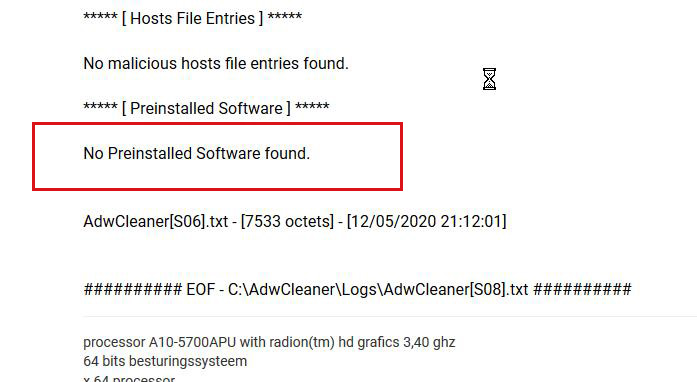
***** [ Preinstalled Software ] *****
No Preinstalled Software found.
AdwCleaner[S06].txt - [7533 octets] - [12/05/2020 21:12:01]
########## EOF - C:\AdwCleaner\Logs\AdwCleaner[S08].txt ##########
abbs, Ik heb enkele keren opnieuw gescand omdat Adwcleaner na het opstarten niet opnieuw op het scherm verscheen, ik hoop dat het goed is. gr roan
# Malwarebytes AdwCleaner 8.0.4.0
# -------------------------------
# Build: 04-03-2020
# Database: 2020-04-08.2 (Cloud)
# Support: https://www.malwarebytes.com/support
#
# -------------------------------
# Mode: Scan
# -------------------------------
# Start: 05-12-2020
# Duration: 00:00:55
# OS: Windows 10 Home
# Scanned: 31802
# Detected: 0
***** [ Services ] *****
No malicious services found.
***** [ Folders ] *****
No malicious folders found.
***** [ Files ] *****
No malicious files found.
***** [ DLL ] *****
No malicious DLLs found.
***** [ WMI ] *****
No malicious WMI found.
***** [ Shortcuts ] *****
No malicious shortcuts found.
***** [ Tasks ] *****
No malicious tasks found.
***** [ Registry ] *****
No malicious registry entries found.
***** [ Chromium (and derivatives) ] *****
No malicious Chromium entries found.
***** [ Chromium URLs ] *****
No malicious Chromium URLs found.
***** [ Firefox (and derivatives) ] *****
No malicious Firefox entries found.
***** [ Firefox URLs ] *****
No malicious Firefox URLs found.
***** [ Hosts File Entries ] *****
No malicious hosts file entries found.
***** [ Preinstalled Software ] *****
No Preinstalled Software found.
AdwCleaner[S06].txt - [7533 octets] - [12/05/2020 21:12:01]
########## EOF - C:\AdwCleaner\Logs\AdwCleaner[S08].txt ##########
processor A10-5700APU with radion(tm) hd grafics 3,40 ghz
64 bits besturingssysteem
x 64 processor
windows 10
avg virusscanner
ccleaner
malwarebytes
64 bits besturingssysteem
x 64 processor
windows 10
avg virusscanner
ccleaner
malwarebytes
-
Sony - Lid geworden op: 19 feb 2005, 13:45
- Locatie: Boom
Dit staat in de scan S00
***** [ Preinstalled Software ] *****
Preinstalled.CyberLinkLabelPrint Folder C:\Program Files (x86)\CYBERLINK\LABELPRINT
Preinstalled.CyberLinkLabelPrint Registry HKLM\Software\Wow6432Node\\Microsoft\Windows\CurrentVersion\Uninstall\InstallShield_{C59C179C-668D-49A9-B6EA-0121CCFC1243}
Preinstalled.CyberLinkLabelPrint Registry HKLM\Software\Wow6432Node\\Microsoft\Windows\CurrentVersion\Uninstall\{C59C179C-668D-49A9-B6EA-0121CCFC1243}
Preinstalled.CyberLinkMediaEspresso Registry HKLM\Software\Wow6432Node\\Microsoft\Windows\CurrentVersion\Uninstall\InstallShield_{E3739848-5329-48E3-8D28-5BBD6E8BE384}
Preinstalled.CyberLinkMediaEspresso Registry HKLM\Software\Wow6432Node\\Microsoft\Windows\CurrentVersion\Uninstall\{E3739848-5329-48E3-8D28-5BBD6E8BE384}
Preinstalled.CyberLinkShellExtension Registry HKLM\Software\Classes\CLSID\{3E2A0A32-6E14-4BAD-AA87-BBB6A75EBFF2}
Preinstalled.LenovoPower2Go Registry HKLM\Software\Microsoft\Windows\CurrentVersion\Explorer\StartupApproved\Run32|CLMLServer_For_P2G8
Preinstalled.LenovoPower2Go Registry HKLM\Software\Microsoft\Windows\CurrentVersion\Explorer\StartupApproved\Run32|CLVirtualDrive
Preinstalled.LenovoPower2Go Registry HKLM\Software\Wow6432Node\\Microsoft\Windows\CurrentVersion\Run|CLMLServer_For_P2G8
Preinstalled.LenovoPower2Go Registry HKLM\Software\Wow6432Node\\Microsoft\Windows\CurrentVersion\Run|CLVirtualDrive
Preinstalled.LenovoPower2Go Registry HKLM\Software\Wow6432Node\\Microsoft\Windows\CurrentVersion\Uninstall\InstallShield_{2A87D48D-3FDF-41fd-97CD-A1E370EFFFE2}
Preinstalled.LenovoPower2Go Registry HKLM\Software\Wow6432Node\\Microsoft\Windows\CurrentVersion\Uninstall\{2A87D48D-3FDF-41fd-97CD-A1E370EFFFE2}
Preinstalled.LenovoPowerDVD Registry HKLM\Software\Microsoft\Windows\CurrentVersion\Explorer\StartupApproved\Run32|RemoteControl10
Preinstalled.LenovoPowerDVD Registry HKLM\Software\Wow6432Node\\Microsoft\Windows\CurrentVersion\Run|RemoteControl10
Preinstalled.LenovoPowerDVD Registry HKLM\Software\Wow6432Node\\Microsoft\Windows\CurrentVersion\Uninstall\InstallShield_{DEC235ED-58A4-4517-A278-C41E8DAEAB3B}
Preinstalled.LenovoPowerDVD Registry HKLM\Software\Wow6432Node\\Microsoft\Windows\CurrentVersion\Uninstall\{DEC235ED-58A4-4517-A278-C41E8DAEAB3B}
########## EOF - C:\AdwCleaner\Logs\AdwCleaner[S00].txt ##########
Als daarna opgekuist werd zijn deze Preinstalled onderdelen verwijderd.
de gegevens hierover zijn terug te vinden in een AdwCleaner[Cxx].txt bestand,
normaal zou het AdwCleaner[C00].txt moeten zijn.
Sony
***** [ Preinstalled Software ] *****
Preinstalled.CyberLinkLabelPrint Folder C:\Program Files (x86)\CYBERLINK\LABELPRINT
Preinstalled.CyberLinkLabelPrint Registry HKLM\Software\Wow6432Node\\Microsoft\Windows\CurrentVersion\Uninstall\InstallShield_{C59C179C-668D-49A9-B6EA-0121CCFC1243}
Preinstalled.CyberLinkLabelPrint Registry HKLM\Software\Wow6432Node\\Microsoft\Windows\CurrentVersion\Uninstall\{C59C179C-668D-49A9-B6EA-0121CCFC1243}
Preinstalled.CyberLinkMediaEspresso Registry HKLM\Software\Wow6432Node\\Microsoft\Windows\CurrentVersion\Uninstall\InstallShield_{E3739848-5329-48E3-8D28-5BBD6E8BE384}
Preinstalled.CyberLinkMediaEspresso Registry HKLM\Software\Wow6432Node\\Microsoft\Windows\CurrentVersion\Uninstall\{E3739848-5329-48E3-8D28-5BBD6E8BE384}
Preinstalled.CyberLinkShellExtension Registry HKLM\Software\Classes\CLSID\{3E2A0A32-6E14-4BAD-AA87-BBB6A75EBFF2}
Preinstalled.LenovoPower2Go Registry HKLM\Software\Microsoft\Windows\CurrentVersion\Explorer\StartupApproved\Run32|CLMLServer_For_P2G8
Preinstalled.LenovoPower2Go Registry HKLM\Software\Microsoft\Windows\CurrentVersion\Explorer\StartupApproved\Run32|CLVirtualDrive
Preinstalled.LenovoPower2Go Registry HKLM\Software\Wow6432Node\\Microsoft\Windows\CurrentVersion\Run|CLMLServer_For_P2G8
Preinstalled.LenovoPower2Go Registry HKLM\Software\Wow6432Node\\Microsoft\Windows\CurrentVersion\Run|CLVirtualDrive
Preinstalled.LenovoPower2Go Registry HKLM\Software\Wow6432Node\\Microsoft\Windows\CurrentVersion\Uninstall\InstallShield_{2A87D48D-3FDF-41fd-97CD-A1E370EFFFE2}
Preinstalled.LenovoPower2Go Registry HKLM\Software\Wow6432Node\\Microsoft\Windows\CurrentVersion\Uninstall\{2A87D48D-3FDF-41fd-97CD-A1E370EFFFE2}
Preinstalled.LenovoPowerDVD Registry HKLM\Software\Microsoft\Windows\CurrentVersion\Explorer\StartupApproved\Run32|RemoteControl10
Preinstalled.LenovoPowerDVD Registry HKLM\Software\Wow6432Node\\Microsoft\Windows\CurrentVersion\Run|RemoteControl10
Preinstalled.LenovoPowerDVD Registry HKLM\Software\Wow6432Node\\Microsoft\Windows\CurrentVersion\Uninstall\InstallShield_{DEC235ED-58A4-4517-A278-C41E8DAEAB3B}
Preinstalled.LenovoPowerDVD Registry HKLM\Software\Wow6432Node\\Microsoft\Windows\CurrentVersion\Uninstall\{DEC235ED-58A4-4517-A278-C41E8DAEAB3B}
########## EOF - C:\AdwCleaner\Logs\AdwCleaner[S00].txt ##########
Als daarna opgekuist werd zijn deze Preinstalled onderdelen verwijderd.
de gegevens hierover zijn terug te vinden in een AdwCleaner[Cxx].txt bestand,
normaal zou het AdwCleaner[C00].txt moeten zijn.
Sony
I  SeniorenNet
SeniorenNet-
abbs - Lid geworden op: 16 dec 2016, 13:49
- Locatie: Leidschendam
- Contacteer:
Hallo,
Gelukkig is er geen man over boord en is [ Preinstalled Software ] overbodig.
Je kan het terug zetten als je het gebruikt:
Klik met de rechtermuisknop op AdwCleaner en kies voor de optie Als administrator uitvoeren.
Herstart je pc als dat niet is gebeurt en vertel hoe je pc nu draait.
Gelukkig is er geen man over boord en is [ Preinstalled Software ] overbodig.
Je kan het terug zetten als je het gebruikt:
Klik met de rechtermuisknop op AdwCleaner en kies voor de optie
Als administrator uitvoeren.
- Klik vervolgens op de knop Quarantaine, klik in het scherm op Voorgeïnstalleerde software (zie afbeelding).
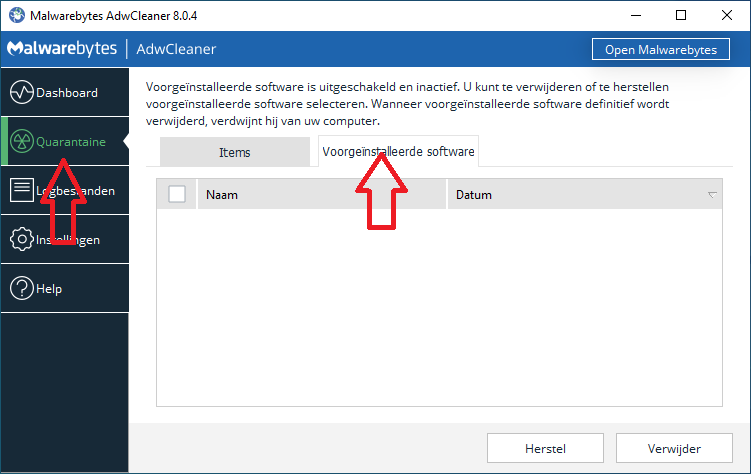
- Vink alles weer aan en klik op Herstel.
- Volg de stappen.
Herstart je pc als dat niet is gebeurt en vertel hoe je pc nu draait.
Groeten abbs
Member of UNITE (Unified Network of Instructors and Trained Eliminators)
Member of UNITE (Unified Network of Instructors and Trained Eliminators)
-
roan - Lid geworden op: 07 jan 2006, 21:55
- Locatie: westvlaanderen
abbs,
Ik heb gedaan zoals gevraagd, wanneer ik klik op herstel zijn er geen stappen meer te volgen
Ik heb de pc handmatig herstart.
De naam van het bestand avg tuneup staat er nog maar de inhoud is weg
gr roan
Ik heb gedaan zoals gevraagd, wanneer ik klik op herstel zijn er geen stappen meer te volgen
Ik heb de pc handmatig herstart.
De naam van het bestand avg tuneup staat er nog maar de inhoud is weg
gr roan
processor A10-5700APU with radion(tm) hd grafics 3,40 ghz
64 bits besturingssysteem
x 64 processor
windows 10
avg virusscanner
ccleaner
malwarebytes
64 bits besturingssysteem
x 64 processor
windows 10
avg virusscanner
ccleaner
malwarebytes
-
abbs - Lid geworden op: 16 dec 2016, 13:49
- Locatie: Leidschendam
- Contacteer:
Hallo,
Waar staat dat AVG tuneup bestand?
En hoe draait de pc nui?
Waar staat dat AVG tuneup bestand?
En hoe draait de pc nui?
Groeten abbs
Member of UNITE (Unified Network of Instructors and Trained Eliminators)
Member of UNITE (Unified Network of Instructors and Trained Eliminators)
-
roan - Lid geworden op: 07 jan 2006, 21:55
- Locatie: westvlaanderen
Abbs,
Het bestand avg tuneup bevind zich, instellingen-apps en onderdelen.
Ik vind dat de pc het momenteel goed doet.
gr roan
Het bestand avg tuneup bevind zich, instellingen-apps en onderdelen.
Ik vind dat de pc het momenteel goed doet.
gr roan
processor A10-5700APU with radion(tm) hd grafics 3,40 ghz
64 bits besturingssysteem
x 64 processor
windows 10
avg virusscanner
ccleaner
malwarebytes
64 bits besturingssysteem
x 64 processor
windows 10
avg virusscanner
ccleaner
malwarebytes
-
abbs - Lid geworden op: 16 dec 2016, 13:49
- Locatie: Leidschendam
- Contacteer:
Hallo,
Op die plaats kan AVG geen kwaad, hoe staat het met je probleem van de "zoek" functie war je het over had.
Met het onderstaande tool ruim je de meeste tools op die we hebben gebruikt:
Download KpRm van Kernel-panik en sla deze op uw bureaublad op.
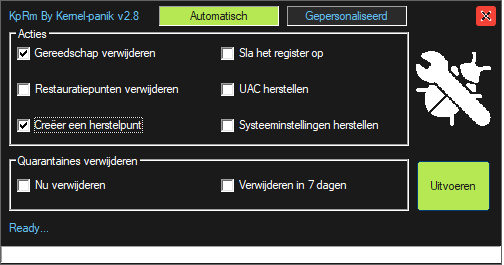
- Creëer een herstelpunt
Op die plaats kan AVG geen kwaad, hoe staat het met je probleem van de "zoek" functie war je het over had.
Met het onderstaande tool ruim je de meeste tools op die we hebben gebruikt:
Download KpRm van Kernel-panik en sla deze op uw bureaublad op.
- Klik met de rechtermuisknop op KpRm.exe en kies voor de optie
 Als administrator uitvoeren.
 - Krijg je een melding van "SmartScreen" klik op Meer informatie en klik op Toch uitvoeren.
- Zet een vinkje bij:
- Creëer een herstelpunt
- Klik op de knop "Uitvoeren"en wacht geduldig tot de tool gereed is.
- Wanneer de tool gereed is wordt er een logbestand aangemaakt met de naam kprm-(date).txt..
- Plaats de inhoud van dit tekstbestand in je volgende bericht.
- Note: Mochten er nog programma's of log bestanden aanwezig zijn mag je die handmatig verwijderen.
Groeten abbs
Member of UNITE (Unified Network of Instructors and Trained Eliminators)
Member of UNITE (Unified Network of Instructors and Trained Eliminators)
-
roan - Lid geworden op: 07 jan 2006, 21:55
- Locatie: westvlaanderen
abbs, ik hoop dat het deze keer van de 1ste x gelukt is.
De zoekfunctie is een zwarte achtergrond met een tekst die begint met how can i help
gr roan
# Run at 15/05/2020 21:28:22
# KpRm (Kernel-panik) version 2.8
# Website https://kernel-panik.me/tool/kprm/
# Run by roan from C:\Users\roan\Desktop
# Computer Name: ANDRE
# OS: Windows 10 X64 (18363)
# Number of passes: 1
- Checked options -
~ Delete Tools
~ Create Restore Point
- Delete Tools -
## AdwCleaner
[OK] C:\Users\roan\Desktop\adwcleaner_8.0.4.exe deleted
[OK] C:\Users\roan\Downloads\adwcleaner_8.0.4.exe deleted
## FRST
[OK] C:\Users\roan\Desktop\Addition.txt deleted
[OK] C:\Users\roan\Desktop\Fixlog.txt deleted
[OK] C:\Users\roan\Desktop\FRST-OlderVersion deleted
[OK] C:\Users\roan\Desktop\FRST.txt deleted
[OK] C:\Users\roan\Desktop\FRST64.exe deleted
[OK] C:\Users\roan\Downloads\Addition.txt deleted
[OK] C:\Users\roan\Downloads\FRST.txt deleted
[OK] C:\Users\roan\Downloads\FRST.txt.txt deleted
[OK] C:\Users\roan\Downloads\FRST64 (1).exe deleted
[OK] C:\Users\roan\Downloads\FRST64.exe deleted
- Other Lines -
## Quarantines keeped
~ C:\AdwCleaner (AdwCleaner)
~ C:\FRST (FRST)
~ C:\ProgramData\Malwarebytes\Malwarebytes Anti-Malware\Quarantine (Malwarebytes Anti-Rootkit)
- Create Restore Point -
[OK] System Restore Point created
- Display System Restore Point -
~ RP named Removed Apple Application Support (64-bit) created at 05/06/2020 19:48:42
~ RP named Windows Update created at 05/10/2020 11:25:05
~ RP named Windows Update created at 05/10/2020 11:25:43
~ RP named AdwCleaner_BeforeCleaning_12/05/2020_21:22:09 created at 05/12/2020 19:22:13
~ RP named KpRm created at 05/15/2020 19:28:33
-- KPRM finished in 53.53s --
De zoekfunctie is een zwarte achtergrond met een tekst die begint met how can i help
gr roan
# Run at 15/05/2020 21:28:22
# KpRm (Kernel-panik) version 2.8
# Website https://kernel-panik.me/tool/kprm/
# Run by roan from C:\Users\roan\Desktop
# Computer Name: ANDRE
# OS: Windows 10 X64 (18363)
# Number of passes: 1
- Checked options -
~ Delete Tools
~ Create Restore Point
- Delete Tools -
## AdwCleaner
[OK] C:\Users\roan\Desktop\adwcleaner_8.0.4.exe deleted
[OK] C:\Users\roan\Downloads\adwcleaner_8.0.4.exe deleted
## FRST
[OK] C:\Users\roan\Desktop\Addition.txt deleted
[OK] C:\Users\roan\Desktop\Fixlog.txt deleted
[OK] C:\Users\roan\Desktop\FRST-OlderVersion deleted
[OK] C:\Users\roan\Desktop\FRST.txt deleted
[OK] C:\Users\roan\Desktop\FRST64.exe deleted
[OK] C:\Users\roan\Downloads\Addition.txt deleted
[OK] C:\Users\roan\Downloads\FRST.txt deleted
[OK] C:\Users\roan\Downloads\FRST.txt.txt deleted
[OK] C:\Users\roan\Downloads\FRST64 (1).exe deleted
[OK] C:\Users\roan\Downloads\FRST64.exe deleted
- Other Lines -
## Quarantines keeped
~ C:\AdwCleaner (AdwCleaner)
~ C:\FRST (FRST)
~ C:\ProgramData\Malwarebytes\Malwarebytes Anti-Malware\Quarantine (Malwarebytes Anti-Rootkit)
- Create Restore Point -
[OK] System Restore Point created
- Display System Restore Point -
~ RP named Removed Apple Application Support (64-bit) created at 05/06/2020 19:48:42
~ RP named Windows Update created at 05/10/2020 11:25:05
~ RP named Windows Update created at 05/10/2020 11:25:43
~ RP named AdwCleaner_BeforeCleaning_12/05/2020_21:22:09 created at 05/12/2020 19:22:13
~ RP named KpRm created at 05/15/2020 19:28:33
-- KPRM finished in 53.53s --
processor A10-5700APU with radion(tm) hd grafics 3,40 ghz
64 bits besturingssysteem
x 64 processor
windows 10
avg virusscanner
ccleaner
malwarebytes
64 bits besturingssysteem
x 64 processor
windows 10
avg virusscanner
ccleaner
malwarebytes
-
abbs - Lid geworden op: 16 dec 2016, 13:49
- Locatie: Leidschendam
- Contacteer:
Hallo,
Kan je daar eens een printscreen van maken.
Hier anders een handleiding: viewtopic.php?f=8&t=188237&sid=63ede404 ... 816ef4bec7
Kan je daar eens een printscreen van maken.
Hier anders een handleiding: viewtopic.php?f=8&t=188237&sid=63ede404 ... 816ef4bec7
Groeten abbs
Member of UNITE (Unified Network of Instructors and Trained Eliminators)
Member of UNITE (Unified Network of Instructors and Trained Eliminators)